Images Now in TidBITS HTML Edition
As those who read TidBITS on our Web site or in RSS are aware, we’re increasingly using screenshots of Mac and iPhone applications to illustrate what we’re saying in the article. In the text edition of TidBITS, those graphics are represented purely by normal links to files in the /resources directory of our Web site. Until this week, we’ve replaced the images in the HTML edition with a [View Image] link to the original on the Web.
Those [View Image] links have been bothering us, so we’ve finally replaced them with the actual images, loaded from our Web site when you open the email message containing the issue. If you have turned off image loading, you’ll see whatever placeholder your email client uses. Clicking an image displays it at full size in your Web browser.
We’ve also tweaked the encoding on our issues so we can finally use accented characters and other special symbols in both the text and HTML editions of TidBITS. That’s right, we can now spell Exposé properly, and we can give prices in pounds (£) as necessary. There’s only one minor caveat – the euro symbol (€) displays properly in the HTML editions of TidBITS, but is replaced in the text edition by a ? because it isn’t supported in the ISO-8859-1 encoding we’re using for text email.
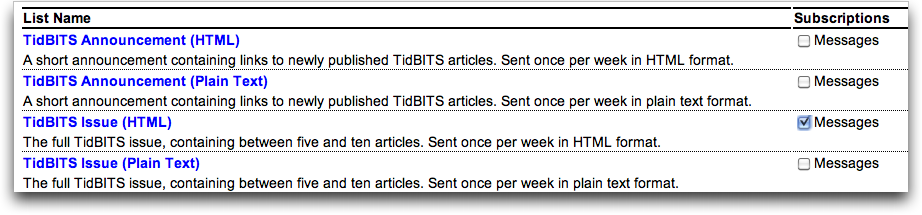
If you’re currently subscribed to the plain text edition of TidBITS but would like to switch to the HTML edition so you can see images inline, click the Email link under Get TidBITS Via in the left-side navigation bar of our Web site (or just visit our mailing list management page), log in using the email address with which you’re subscribed, select “TidBITS Issue (HTML),” deselect other editions as necessary, and click the Submit link.
We're looking into ISO-8859-15 encoding for the plain text email as a way of getting the euro symbol to render properly. Anyone know of any gotchas or other things we should be aware of should we try such encoding? (With 18,000 subscribers to that list, we like to err on the side of caution.)
Nevermind, I was wrong in my first post . Pound symbol showed, Euro did not.
Thanks! I asked for this feature not so long ago, and you delivered. Maybe just luck, of course, or maybe many people asked for this. In any case, thanks!
Awesome. Love the new format. Makes it so easy to understand the story by illustrating with images. Excellent. Also makes it much easier to skim and find articles of interest.
Could you use UTF-8 instead? As far as I can tell this is the way the world is going -- the ISO 8859 character sets appear to be less and less relevant.
Others have said this privately too, and we'll look into it!
Character encoding issues give me hives. :)
Hi Adam. Don't fret about the euro symbol, we're quite used to occasional encoding issues with it. Just spell out euro - it'll be fine.
PS: for reasons to do with the UK opting out when the naming discussions were in progress, the plural is also euro. It's only capitalised when beginning a sentence. But you knew that already, of course.
Thanks, Bernard! It looks like what we do is of course only half the battle, since it depends as well on what individual email clients do. We tested a bunch, but apparently there are even more variables that we missed.
As far as the word "euro" is concerned, I'm very interested to hear that it's both singular and plural, and should be capitalized only at the beginning of sentences - I'll have to look into that more for our style guide.
Currencies should never be capitalized, which is why they make good scrabble words. You might say 'the US Dollar' but you would say, 'it cost three dollars'.
But keep in mind, we're a bit Capital Happy over on This Side of the Atlantic. We tend to used Capitals for any word we think might be Important.
Spanish, for example, uses capitals much less. They don't even capitalize the days of the week or months of the year.
Please add a link at the top of the new html page that allows the users to view the html page directly on your web site, as sometimes the images won't display when reading the email only.
That should be pretty easy - I'll look into making the title of the article a link to the original.
In the meantime, however, you can always click the "comments" link at the top or bottom of the article in the HTML edition to jump to that article on the Web (though, admittedly to the comments section).
I wish there was a better solution for images than this. HTML e-mail that loads images from a server is a security and privacy risk, which is why I have it turned off in Mail (and wish I could turn it off on my Touch). Yet sending images with the message increases bandwidth requirements and can run afoul of spam filters and message size limits.
Yes, I continue to be a member of the cult of Plain Text e-mail messaging. :-) Thanks for keeping plain text in the mix.
Don't worry - we have no plans to drop the text edition ever, since it's still by far the largest of our four editions. Sometimes, plain text is just the best (I still do almost all my email replies in plain text, even if the original had styles).
You should quote your lovely wife:
"Sometimes ASCII is the best use of bandwidth"
I have images turned off in Mail.app, which just means that on the TidBITS mail I have to press "load images".
I was a long-time subscriber to the plain-text list, and almost all my mail is plain-text. I switched to the HTML issue a few years ago, and I suggest you give it a try.
The TidBITS HTML is, quite simply, HTML email done right. There's no tags, no unnecessary fluff. the table of contents links to the section of the issue and links in the articles are link text, and the article headers are in tags. That's about it.
If all HTML email looked like TidBITS, no one would object to HTML email.
We're hearing from some people using Apple Mail 3.6 that the UTF-8 character encoding doesn't seem to be picked up automatically, as it should. However, if you change the text encoding in Message > Text Encoding to Unicode (UTF-8), it works.