Firmware Update for Apple’s 802.11n Base Stations
Apple has released AirPort Base Station and Time Capsule Firmware Update 7.6, which fixes only three problems for the 802.11n-based AirPort Extreme, AirPort Express, and Time Capsule. Nevertheless, it proved to be a bit more interesting than I initially anticipated. Apple says that the update fixes:
- An issue with performance on overlapping wireless networks
- An issue with AirPlay audio streaming
-
An issue with configuring multiple entries for DNS servers
I can’t say that I’ve run into any of these specifically, though I’ve certainly experienced problems with AirPlay in the past, and AirPort Utility said that my AirPort Express was reporting problems once the firmware update appeared. Even though my AirPort Extreme also needed the firmware update, its issues apparently weren’t considered serious enough for it to label them as problems. Updating was simply a matter of running AirPort Utility, selecting my AirPort Express on the left, and then clicking the Update Firmware button and waiting for it to download, install, and restart.

What I found more interesting was that Apple’s iOS version of AirPort Utility provides just as good an experience, and a more attractive one. I tapped the AirPort Extreme icon in the diagram, and then tapped Version > Download and Install to update my AirPort Extreme too.
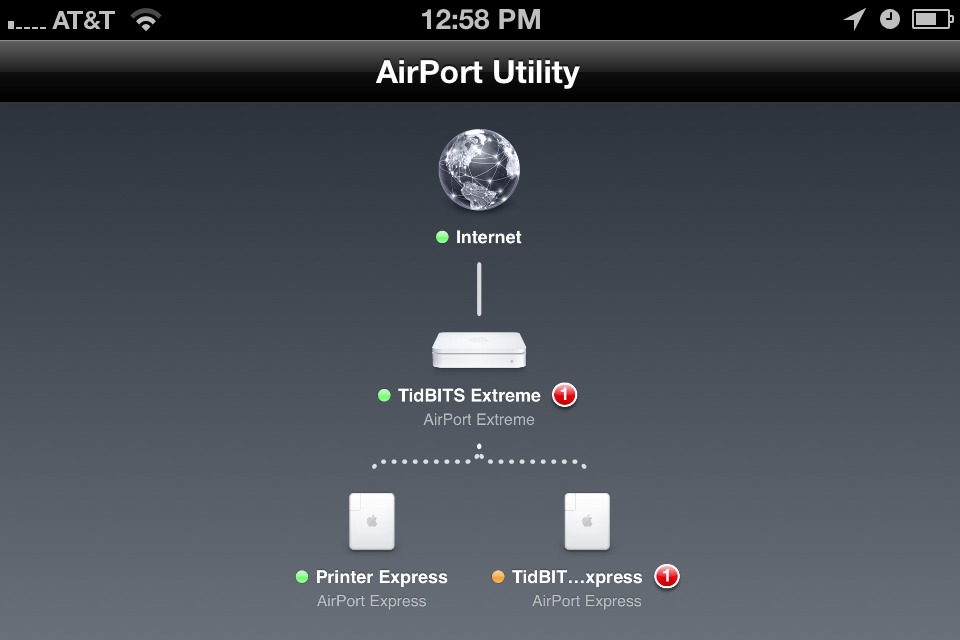
Notably missing from this update is iCloud support for remote access to files on AirPort disks and Time Capsules via Back to My Mac, which worked (and presumably still does) via MobileMe. AirPort Utility on the Mac, which hasn’t been updated recently, still has a MobileMe pane under the Advanced preferences, and no similar controls exist at all in the iOS version of AirPort Utility.
Somewhat surprisingly, given how smoothly my upgrades went, a number of commenters on the TidBITS site have reported problems with the firmware update. In most cases, the updated base station fails to appear in AirPort Utility after the update. Solutions range from cycling the base station’s power all the way to needing to perform a factory reset, after which the base station must be reconfigured from scratch. Because of this, it would be prudent to run AirPort Utility on the Mac, and choose File > Export Configuration File. Then, if something goes wrong and you need to reset the base station, you can use File > Import Configuration File to return it to its previous configuration set (this doesn’t change the firmware, just the
settings).
I upgraded my firmware on my Extreme Base station and my Express unit and it lost my Express base station.
Now I need to reconnect with Ethernet to get online.
Something went wrong.
I found the same problem with Time Capsule
As I wrote in the article, I updated the AirPort Express first, then the AirPort Extreme - it's possible that was the best order when doing two.
The AirPort Express I updated using AirPort Utility 5.5.3 in 10.6 Snow Leopard, but from a Mac connected to Ethernet. The AirPort Extreme I updated from the iOS AirPort Utility, which was of course connected via Wi-Fi at the time.
When in doubt, connecting via Ethernet will eliminate a variable, though I can't think of what might have gone wrong in your case, since you certainly should be able to update via Wi-Fi.
Airport utility can no longer find my Airport devices.
Using Aiport Utility v.5.5.
Still on 10.6.8
Same here. Yellow(amber) LED solid. Nothing else
I had to eventually return my Airport Extreme and Express to factory default settings and recreate a new network. Man this was not a good experience. First time I ever had a problem with an upgrade.
Sorry to hear it! I had no problems, but with the comments here, it seems clear that others are.
Interestingly enough my Airport Extreme showed an error after the update was known to my mac. Previous to this my airports were all green. I am wondering if apple have identified certain models which have known issues and indicate this to the user by enabling the error condition?
My updates were successful to all my devices and everything is green again
That seems likely to me - there's no point in reporting a problem before the update, since it can't be fixed, but once the update is available, it can identify itself as the fix for a known issue in particular models or versions.
Updated 3 Airport Express stations. Now AirPort Utility 5.5.3 cannot find any. Did factory hard reset (powered down, held in reset button, powered back on while still holding reset button, got rapid flashing) still AirPort Utility cannot find
this might sound dumb but I have had the same problem. Unplug the ethernet cord from the back of your computer and try to connect via Airport. It worked for me in the past. Good Luck
Ouch! Since a factory reset will totally blow away all configurations, including the network, you have to reselect the network in the AirPort menu to get back on that way (or use Ethernet).
And as bensonk notes, unplugging things and restarting Macs and generally aiming for a clean start is worth a try. Good luck!
After the update I notice that entering Time Machine is almost instantaneous, whereas before the update it would take 10 to 20 seconds.
I found my airport express blinking yellow this morning and checked Airport Utility and saw that it needed to be updated. I ran the update and it disappeared completely! Then I updated my Extreme and that worked fine.
I simply unplugged my Express from the wall, waited a few seconds and plugged it back in and all is good now!
Sometimes it is the simple fixes that work best.
Lenny is 100% right.
I had exactly the same problem.
JUST power off your AP Express re-power, light goes green then solid amber...wait 30 seconds for the green light. And thank you Houston we are good to go!
I updated my TC first, no problem. Then Express. On restart the Express did not appear in Airport Utility. It was blinking amber. I unplugged it and plugged it back in, and it booted up (green) and appeared in Airport Utility. I've had not problems since, either with connectivity or seeing the two base stations in AU.
managing the Airports *Express, Extreme or capsule, has never been 100% in my experience. After this update, I lost an AEXPress. I had to reset to get it recognized. It is not an N model. Nor did update matter to it. I do wish Apple made the iOS app more detailed/administrative.
So just updating another AirPort on your network caused an old 802.11g-based AirPort Express to disappear? That's really strange, since, as you say, this update applies only to the new 802.11n models.
i did the same but you have to unplug the apple express so they will all restart.
Read on Apple forum that audio streaming is clipping out with the the update.
It fixes more than just those three problems. Security advisory: https://support.apple.com/kb/HT5005
Yes, that's true - I didn't mention it because it's such a difficult-to-exploit vulnerability, requiring a privileged network position.
I also encountered problems with the firmware. Airport Utility could not find my Express after I updated to firmware 7.6 (even with factory resets). After a frustrating morning I ended up reverting the firmware 7.5.2 and re-established my old settings with no issues since. I will wait for a few more days to see if any other forums reveal possible solutions before I update back to firmware 7.6.
I updated a Time Capsule and Airport Extreme. Both went green after updating firmware to 7.6 but did not show up in Airport Utility. Rescanning and cycling power did not correct it on the the TC & AE. All of my computers were connected via WiFi. On my Mac, I simply clicked the WiFi icon and selected to join my network again. It connected up right away and immediately both AE and TC showed back up in Utility. All settings were maintained and no problems since.
Apple did it again. Am now heading off to buy a new dual band gigabit router.
Of course apple won't own up to their screw-up.
As usual, apple wins and I get screwed.
Why do you need to buy a new one? Nothing I've heard indicates that even a foobared update will brick a base station - you can always go back to factory defaults or even revert to previous firmware.
I have a G5 iMac with OS 10.5.8 and a first generation Time Capsule with 500 GB HD. I cannot access "Export Configuration File" under the File menu, it is grayed out. I'm forced to chance a total reset in order to upgrade the firmware. Since I'm not experiencing any problems, what am I gaining by performing this update?
Just a follow-up, I decided to take a chance, and the firmware update proceeded without a glitch. No problem, so anyone with similar setup can perhaps be a bit more confident in the results.
One thing that may not be clear is that you have to double-click the base station in AirPort Utility so it's "open" before you can export its configuration. Just selecting it in the left sidebar isn't enough.
Since updating our Extreme BS to 7.6 our b/g/n compat. wifi network has slowed to a crawl (I mean web/mail is almost unusable), even with no slower devices attached (b/g). Previously not a problem.
I can resolve by selecting 'n' only at 2.4 - everything is then fine again, except for our poor 'older' devices who of course, can't connect.
Any others encountered this problem?