Boingo Wi-Finder App for iOS Tracks Wireless Data Usage
A new version of the Boingo Wi-Finder iOS app provides insight into how much wireless data you’re consuming, split between Wi-Fi and cellular. The app’s Usage view consults iOS’s statistics for data consumption and repackages them in a few useful ways. (To be fair, cellular data monitoring isn’t new ground; XVision’s $0.99 DataMan app has provided a very similar capability for some time, but the even more capable DataMan Pro was pulled from the App Store by Apple before we had a chance to write about it.)
First, Boingo Wi-Finder shows how much of your data plan you’ve consumed to date. Second, it gives you a sense of Wi-Fi consumption for comparison. Third, using your data plan terms, it estimates what you would have paid in cellular overage charges if you had relied solely on cellular data instead of Wi-Fi.
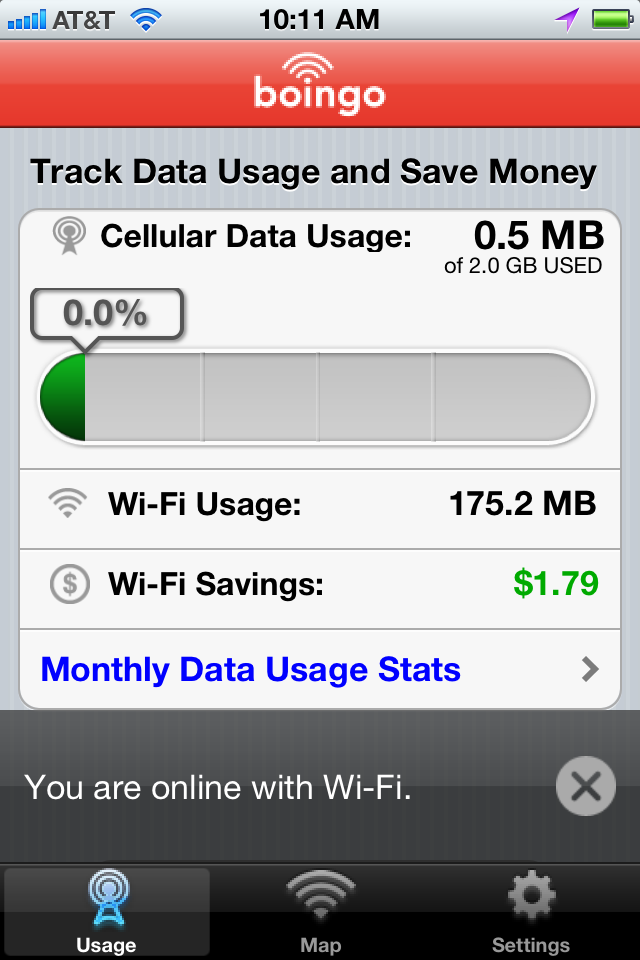
Because the app consults iOS data, it can only put a mark in the sand to start calculating usage after the first time it’s launched. After that, it resets the counter on the billing date you set by tapping Settings > Data Usage Settings. You can also adjust how much you pay for mobile broadband and the amount of data included in your plan. (In all likelihood, you probably have to launch the app after restarting your device as well, as is true of DataMan, since otherwise it can’t put that mark in the sand again.)
Boingo Wireless’s primary business is selling access on a flat rate to an aggregated network of hundreds of thousands of Wi-Fi hotspots worldwide, and the app was and remains a gateway to automatic logins with an account on supported networks. It also shows free Wi-Fi hotspots (both ones it has verified and those submitted by users) that don’t require a subscription or use of its software. Boingo charges $8 per month for unlimited worldwide mobile device use (one device at a time), and $10 per month in the Americas, which includes two devices at a time, whether laptops or mobile.
Thanks, Glenn. I always have to remember to reset my cell data usage stats each month in the Settings app; this app will make my life easier, even though I don't use Boingo, because it remembers when my billing cycle starts.
Thank you for this article. The good news is that the app can accommodate AT&T plans like mine that have unlimited data. I was pleasantly surprised!