How to Google Earth
[Tristan, age 8, wrote this piece the weekend after returning from San Francisco, where he attended Macworld Expo with me for a morning (see “Take Your Child to Work Day, Macworld Expo Style,” 2007-01-22). It’s by no means the first time he has been mentioned in TidBITS, but it is his first byline! -Tonya]
In Google Earth, you can fly from San Diego (in the United States) to Portsmouth (in the United Kingdom) in two seconds! In fact, you can fly to anywhere on the globe that Google Earth knows about. If you want to see the Great Wall of China, you can! Google Earth works on newer Macintoshes and Windows computers, and the Google Earth Downloads page gives the details for what you need.
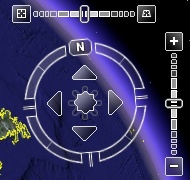
Once you download, install, and run Google Earth, type a place where you want to go in the Search box. Spell it correctly and hit Return. Once you’re at your destination, to navigate, notice the controls at the upper right. The vertical bar with the plus and the minus is where you click to zoom in and out. The circle with the N on it is a compass: click one of its four arrows to move in a direction. I suppose you know your directions, but if not, the arrow pointing towards the N is north. The one pointing at the plus and minus is east. The one pointing away from the N is south. And the fourth arrow is west.
I like Google Earth for looking at special landmarks like the USS Constitution in Boston, but I don’t think it is reliable, because it often doesn’t understand my spelling, and I had trouble finding the HMS Victory because Google Earth doesn’t have a way for me to say that I am looking for a ship.