Find Strongest Wi-Fi Networks Easily
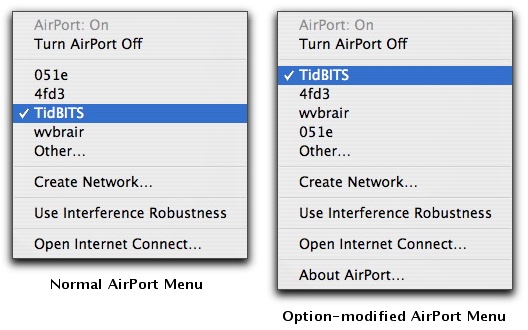
Like most other Mac users, when I’m travelling, I often need to connect to a Wi-Fi network to access the Internet for email and Web browsing. But what if there are multiple available networks and I don’t know which would be best to use? In the past, I would usually bring up iStumbler (MacStumbler hasn’t been updated in years), but Take Control author Sharon Zardetto Aker alerted me to a simpler method that’s built into Mac OS X. If you hold down the Option key when dropping the AirPort status menu, it lists available networks in order of signal strength, rather than the usual (and useless) alphabetical sort. Simple, yet effective, although the signal strength sort should arguably be the default,
not the hidden option. Alas, the AirPort menu doesn’t indicate which networks require a password for access. If you run into that problem regularly and don’t mind running extra software all the time, check out Christoph Sinai’s CoconutWiFi, which provides a constantly updating indicator of wireless network accessibility (see “CoconutWiFi Reveals Nearby Networks, Status,” 2006-09-11).