Get More Storage for Testing Dropbox Camera Uploads
If you’re using Dropbox and would like to increase your amount of storage for free, Dropbox is giving out up to 3 GB of additional storage space for people who are willing to beta test the new Camera Upload feature in the desktop Dropbox application. The Camera Upload feature is a bit like iCloud’s Photo Stream, and works with Mac, Windows, and Android versions of the Dropbox software.
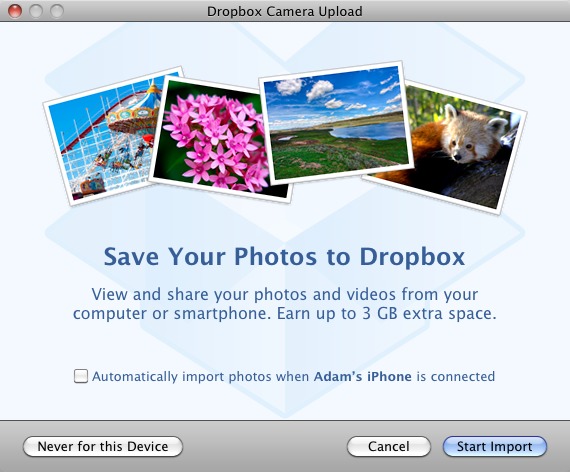
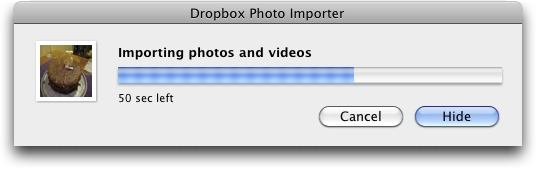
For the desktop versions of Dropbox, the Camera Upload feature automatically transfers photos and videos from any camera or iOS device to a new Camera Uploads folder in your Dropbox folder, displaying a dialog for each device that you connect and offering the option to upload automatically in the future. Click the Start Import button and Dropbox copies all the photos and videos locally, then starts uploading them to the Dropbox site for synchronizing with your other devices. A new View Progress menu command in the Dropbox menu displays a progress dialog so you can track the import. Once the files are imported they’ll be renamed with the date and time the picture was taken. Copied photos
and videos are not removed from the camera, but they won’t be uploaded again even if you rename them or move them out of the Camera Uploads folder.
For the first photo you upload, Dropbox will credit your account with an extra 500 MB of storage space, and every subsequent 500 MB you transfer via the Camera Upload feature will add another 500 MB, up to a total of 3 GB. (Check how much space you have before you start uploading, so you will know when
you’ve gotten the full 3 GB. You can also check the Dropbox Events page to see if Dropbox has credited your account with the extra storage.) You can delete the photos and videos after they’ve been uploaded, but the extra storage space is permanent. Only files uploaded via the Camera Upload feature count; Dropbox says you can’t just copy a large file into that folder. Luckily, it’s easy to take a bunch of quick photos and videos to hit the limit — it’s not as though Dropbox cares about the quality. Note that your account won’t reflect the additional space until all the photos have been uploaded, which might take some time (I’m watching a 313 MB movie upload right now, with an
estimated 3 hours to go).
To participate in the beta, all you need to do is install the latest Experimental Forum Build of the desktop Dropbox application and start uploading photos; as of this writing, you can get version 1.3.27 for Mac OS X, though that will likely change soon. [Update: The beta is now at 1.3.30; be sure to go through the link above to get to whatever the latest version is. -Adam] Dropbox hasn’t said how much longer the beta will last (it has been going on for about a month), so it may be worth acting with some alacrity.
Although I haven’t seen any problems with the Camera Upload feature or the beta version of Dropbox, if you’re hesitant about using a beta of such an essential tool, you can still get 250 MB of bonus space for each friend you refer to Dropbox. (And if you’re not currently using Dropbox but want to sign up for a free account, feel free to use my referral link!)
Thanks for the heads up.
Dropbox needs to change the arrangement of the folders. There's now "Camera Uploads" and "Photos" by default. At a minimum put them together alphabetically. But subfolders make more sense.
Yeah, I'm not quite sure they've thought through exactly how the user will interact with these folders at the end. Camera Uploads is like Photo Stream in that it's your photos, on your devices, only. The Photos folder is for public display of photos as well as syncing between your devices.
We'll see if things change before the beta is over.
Once again TidBits comes up with something great. Thanks for sharing. Just uploaded from my Canon IXY. Got the extra MB storage instantly.
Will plan to take more pictures and send feedback to help them to help us make this a great feature.
See what you started. Should pat yourselves on the back. It's custom where I live to show thanks and appreciation with a bow... m(_ _)m
You're very welcome!
Any ideas on how to monitor whether you've recieved the credits for extra space?
I can't remember how much space I had to begin with so looking at my total space allowed doesn't work for me.
I checked the "Recent Events" page:
https://www.dropbox.com/events
My first upload triggered an increase in space. But, there's no mention of space increases for subsequent uploads.
An interesting question that I was just pondering (I just added advice in the article to check first), but no, I don't know of any way to determine after the fact if you've gotten all the free space. You could probably calculate it (add up the size of all the files in the Camera Uploads folder with Mac OS X's Inspector (select all, press Command-Option-I).
The Events page you mention does have events for each of the space increases, but finding them all in my account at least (I share with a lot of people) would be a daunting task.
Apparently, it takes quite a bit of time for Dropbox to recognize that a video has been uploaded via the "Camera Upload." At least that's the case today.
I shot a nonsense video on my iPhone 4S; when I connected it to my iMac, Camera Upload recognized the new video and uploaded it. And, it appeared in the "Camera Uploads" directory in my local Dropbox folder, apparently having been downloaded/synched from the Dropbox service.
However, when I logged into Dropbox using the web interface, my video didn't appear for an hour or so.
So, maybe my space credit will show up as the videos appear on the web.
Yes, the Events page shows an increase to my space quota just after it registered that my 370MB video was uploaded.
I uploaded the video about four hours ago but Events says it was uploaded only '2 hrs ago'.
So there's a bit of lag recognizing the video upload.
A bit of lag? I uploaded 2.5 GB of videos yesterday evening, and now (the next morning), I'm still not seeing the extra space and DB is showing "out of space!"
What can I do?
You specifically let the Camera Upload feature upload those videos? Perhaps there's an edge condition where it gets confused if the feature tries to upload more than you have space for? Here's Dropbox's support page on the topic (also linked in the article).
https://www.dropbox.com/help/287
The other possibility is that I see that 1.3.30 is now the current beta - maybe you need that version? Here's the link:
http://forums.dropbox.com/topic.php?id=57686&replies=12
It took almost a full day (24 hours) for all my video to show up in Dropbox and be awarded my credit.
Upload just a bit at a time.
According to the Dropbox Events page, I've been uploading photos (and steadily gaining extra Dropbox space via Camera Upload) since 2/5. I've experienced no problems with the beta builds...they work as advertised.
So here's my question: I got rid of Picasa because it was storing duplicates of my iPhoto library on my hard drive, using up a lot of space. Does this mean that Dropbox is going to be duplicating my iPhoto library not only on their website but also in the Dropbox folder on my MacBook? In that case...I just don't have that kind of room to spare.
--- followup report next morning: Before adding Photo Uploads, I had 4.6 Gb free space on my HD. Now I have 2.6. So I've gained 1.5 Gb on Dropbox and lost 2 Gb on my Hard Drive. I guess I may be deleting some photos from my local Dropbox folder.
Dropbox seems to not have a way for me to store stuff without using up my local HD space...Glad I have cx.com for that.
For the purposes of getting more free space from Dropbox, you just have to get the photos/videos uploaded to Dropbox and have the space credited to your account. You can then delete the photos on your hard drive to reclaim the space.
As far as your more general issue, Dropbox has a feature called Selective Sync that enables you to avoid storing some files on a particular Mac. It's in the Dropbox menu, Preferences > Advanced > Selective Sync. Just deselect those folders whose contents you don't want stored on your Mac. This is good for reducing disk usage on a small MacBook Air drive, for instance.
Adam, you are such a great resource! This is a feature I'd never found.
Alternatively, I realize I could move my Dropbox folder to one of my networked drives (hooked up to Airport Extreme)where I have lots of space.
Yes, you can move it, although I've never tried that. I'd be a little careful to make sure you move it to a drive that's always available, or you could end up with some version conflicts.
This is slightly old news. I was able to add another 5 gb of storage back in late February - I now have total 7.5 gb.
I guess they might have reduced the storage with their latest beta?
See posting from another blog: http://www.flyertalk.com/forum/travel-technology/1311583-up-5gb-dropbox-space-free-beta-test.html
Yep. I'd heard about it a while ago, but didn't get around to testing it carefully enough such that I could recommend that TidBITS users try it. And, of course, documenting it thoroughly, unlike random forum posts.
I don't see the dialog you mentioned in the TidBits newsletter. The new DropBox does have the sync option selected but otherwise I don't see how to use it. There is no camera folder in my DropBox folder either. How do I get this started? Is an iOS app upgrade also required?
Thanks,
doug
When you hover over the Dropbox icon in the menu bar, do you get a tooltip telling you that it's version 1.3.27? For me, there was nothing to do other than install that new version.
IMPORTANT! I've figured out a bit more about how Dropbox is linking to their betas, and it's important that you get the latest version by using this URL, not the one that was in the original version of this article (which went out in email).
https://forums.dropbox.com/forum-build.php
How much space does my Dropbox have?:
https://www.dropbox.com/help/14
MotionMan
Same as Doug Lerner, I downloaded the version ending now in .31 and no Camera nothing. But there IS a Photos folder. Is that it? Since I'd already zapped the old version, I don't know if this photo folder was in it since i haven't used Dropbox in a while.
No, the Photos folder is old.
You know, the View Progress menu item shows up only during the actual download from the camera, so that not being present is a red herring, I think.
Connect your camera or iPhone and see what happens. Dropbox should pop up a dialog. Also make sure the feature is enabled in the preferences (in my 1.3.27 version, which hasn't auto-updated, it's in General).
Thanks for the tip! Their doc says that you can get the space only by uploading using camera sync: but after you've gotten it, can you delete the photos and use it for anything? (I'd use it for photos anyway, but only after I've sorted and organized them with iPhoto.)