Get a Free, Non-Expiring Mac.com Address for iChat
A TidBITS reader writes:
It seems that as part of the conversion from .Mac to MobileMe, Apple no longer allows expired MobileMe accounts to be used for iChat. My mother-in-law got a 60-day free MobileMe account solely for iChat purposes. As soon as she cancelled it (shortly before the free 60 days expired), she was no longer able to use iChat.
It’s true that a me.com address expires if you don’t subscribe to MobileMe within the free period. Apple is doing all it can to encourage people to use the paid service. If you were a subscriber to .Mac, the precursor to MobileMe, then you already have a mac.com address that will work in the future, even if you opted to not renew your .Mac/MobileMe account.
However, you can also create a free mac.com address for use with iChat that won’t expire. It can be used only for iChat, and doesn’t include email or any of the other MobileMe features, including encrypted iChat messaging.
Here’s how:
- In iChat, choose Preferences from the iChat menu.
- Click the Accounts icon at the top of the window.
- Click the + (plus) button in the lower-left corner to create a new account.
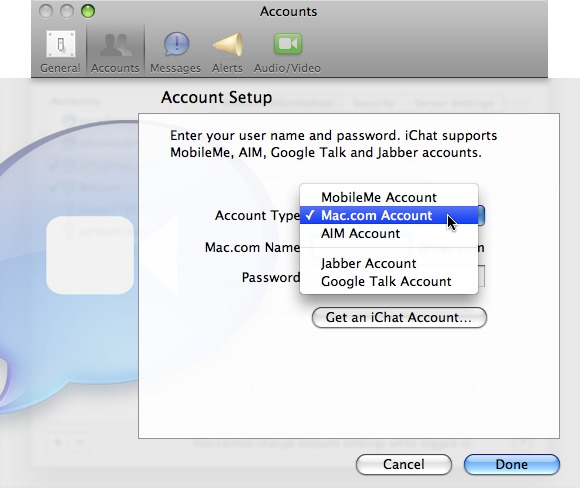
- Click the Get an iChat Account button, which takes you to Apple’s site in your Web browser.
- Fill out the fields in the Create Your iChat ID form and click Continue. If your chosen screen name is already taken, you’ll need to come up with a new one.
- Go back to iChat’s preferences and choose Mac.com Account from the Account Type pop-up menu.
- Enter your just-created user name and password in the fields provided, then click Done.
This technique is also helpful for creating extra iChat addresses; for example, it can be handy for people who want to separate work and personal chats. When the account is enabled, you’ll see two AIM Buddy Lists, which you can populate separately and run simultaneously.