Savescreenie 2.0
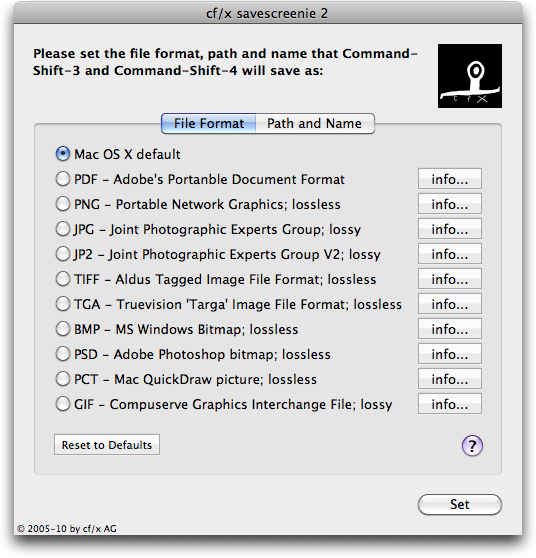
Long ago, our article “How to Change Screen Capture Formats” (27 June 2005), prompted Christian Franz to create a small utility called Savescreenie to ease the process of changing Mac OS X’s default screenshot format. Five years later, Christian’s cf/x Software has released the free Savescreenie 2.0. It now supports a number of additional file formats (10 in all), and enables you to set the default location and base name for screenshots. Savescreenie 2.0 requires Mac OS X 10.5 Leopard or later and works on both Intel- and PowerPC-based Macs. So if you prefer a screenshot format other than Mac OS X’s default of
PNG, or would prefer that your screenshots end up somewhere other than on the Desktop, give Savescreenie a try. (Free, 1.0 MB)
I tried this savescreenie 2.0 on my home computer running 10.6.4 and it worked great!! Installed it on my work computer running 10.5.8 and not only did it not work, but it disabled the keyboard shortcut for capturing selected area and my menu clock disappeared and system preferences cannot bring it back! Any way to reverse it?
That's very odd, since I wouldn't think that Savescreenie would even have the capability of affecting those settings. I'll ask Christian about it. I presume you've restarted to make sure everything is starting fresh?
After talking with Christian, it seems likely that something else happened at roughly the same time, since many of these settings are simply unrelated. To undo everything that Savescreenie does, issue the following command in Terminal:
rm ~/Library/Preferences/com.apple.screencapture.plist
and then reboot the Mac.
Will give it a try and report back. Thanks.
The command in Terminal brought everything back to normal - menu items, keyboard shortcut - everything seems back to normal. Problem machine: iMac 2.16 GHz Intel Core 2 Duo - 2 GB 667 MHz DDR2 SDRAM - Model Identifier: iMac6,1 - will email more info later.
Thanks,
Bob