Enable Quick Look for Markdown Files
We rely on Markdown-formatted text files for TidBITS articles, but one of the slight annoyances of doing so has been that we haven’t been able to use Quick Look to glance at the contents of an article, even though it’s just text. Luckily, this is a solved problem (and the solution isn’t even new — it’s just that I finally got around to looking for it).
Said solution is Phil Toland’s free QLMarkdown generator, which has worked perfectly in my testing. To be recognized as Markdown by QLMarkdown, files need to have one of the following filename extensions: .markdown, .mdown, .md, .mdml, .mdwn, .mkd, or .mmd.
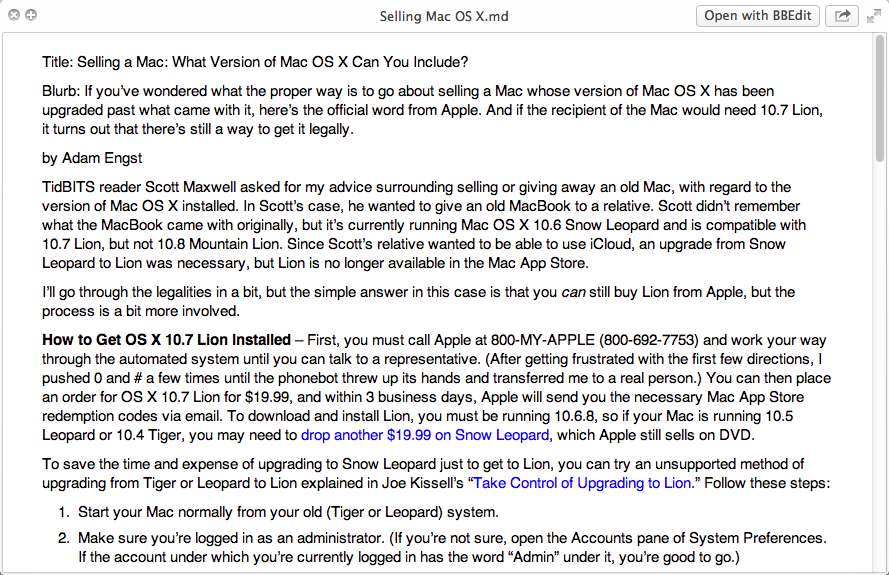
To install QLMarkdown, download the latest version (currently 1.3), expand it, and copy the QLMarkdown.qlgenerator file to either ~/Library/QuickLook (to make it available to just your user) or to /Library/QuickLook (to make it available to all users). Remember that if you’re using OS X 10.8 Mountain Lion or 10.7 Lion, you’ll need to hold down Option and
choose Go > Library in the Finder to reveal the user’s hidden Library folder (for details, see “Dealing with Lion’s Hidden Library,” 20 July 2011).
If you don’t like the look of the text in the previews, you can change nearly everything by modifying the built-in CSS stylesheet. Follow these steps:
-
Control-click the
QLMarkdown.qlgeneratorfile and choose Show Package Contents. -
Navigate to
/Contents/Resources. -
In a text editor like BBEdit or TextWrangler, open
styles.css, make your desired changes (I chose a different font and increased the font size), and save. In my testing, there was no need to do anything else to have the new styles honored — just preview another file to see them.
Sweet! Thanks!
Love it. I always tell myself I should use Markdown more.
FYI, Fletcher Penny has a useful one for MultiMarkdown, which would work for straight Markdown as well.
http://fletcherpenney.net/multimarkdown/download/
iA Writer is also available on the Mac App Store and installs a Markdown QuickLook generator by default. It's not free, but it's a beautiful and simply crafted all that I use every day.
> ...Phil Toland, who has also created a Markdown parser in C, which I gather is relatively unusual.
It's true that the parser QLMarkdown uses is written in C, but it's actually Discount by David Parsons (http://www.pell.portland.or.us/%7Eorc/Code/markdown/). John Gruber's original markdown implementation was in Perl, but there are now many options in a number of different languages.
Whoops - my mistake in attribution. I'll just remove that bit, since it's not really important anyway.