TextWrangler 4.5
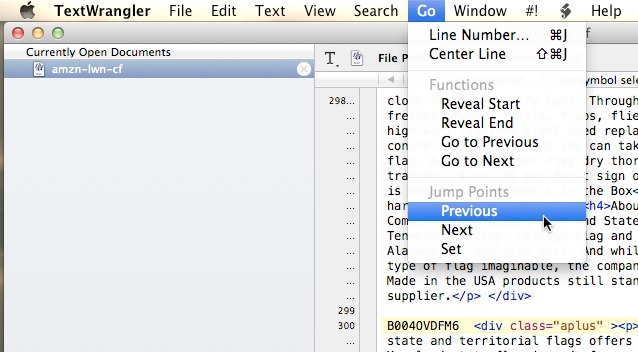
Offering a significant update to its free general-purpose text editor, Bare Bones Software has released TextWrangler 4.5 with a Dostoyevskian list of additions, improvements, and fixes that brings the app in line with many of the current features found in its more powerful (and non-free) sibling, BBEdit. One of the first additions you’ll notice is the new Go menu, which liberates several navigation commands from the previously overcrowded Search menu. As in BBEdit’s Go Menu, you’ll be able to navigate between “jump points” within a document — either those spots where you’ve placed a cursor or ones that you specifically set. You can move around to the various
points by selecting Previous or Next from the Go menu, or specify a line number.
The Search menu adds a Compare Against Previous Version item, which uses OS X’s Versions to compare the active document against a previously saved version. And document versioning goes back to the point where the document was originally saved (as long as you don’t hit the limit set by OS X). The document window has been rejiggered along the lines of BBEdit, with the text view toolbar at the top (displaying the document path) slimmed down to a single line and Last Saved indicator moved to the bottom. A new keyboard
preference has been added, enabling you to move the insertion point by pressing Page Up or Page Down (added to aid those “refugees from other platforms” where that’s the default behavior). TextWrangler is also now compatible with Retina displays.
TextWrangler 4.5 requires Mac OS X 10.6.8 Snow Leopard or later. However, if you want to use the new versioning functionality, you’ll need at least 10.7 Lion. (Free from Bare Bones Software and the Mac App Store, 9.6 MB, release notes)