TipBITS: Always Show Window Proxy Icons
One of the least known and most useful shortcuts in the Mac toolbox has long been the capability to use a window’s proxy icon—the little icon next to the window’s title—as though it were any other icon in the Finder.
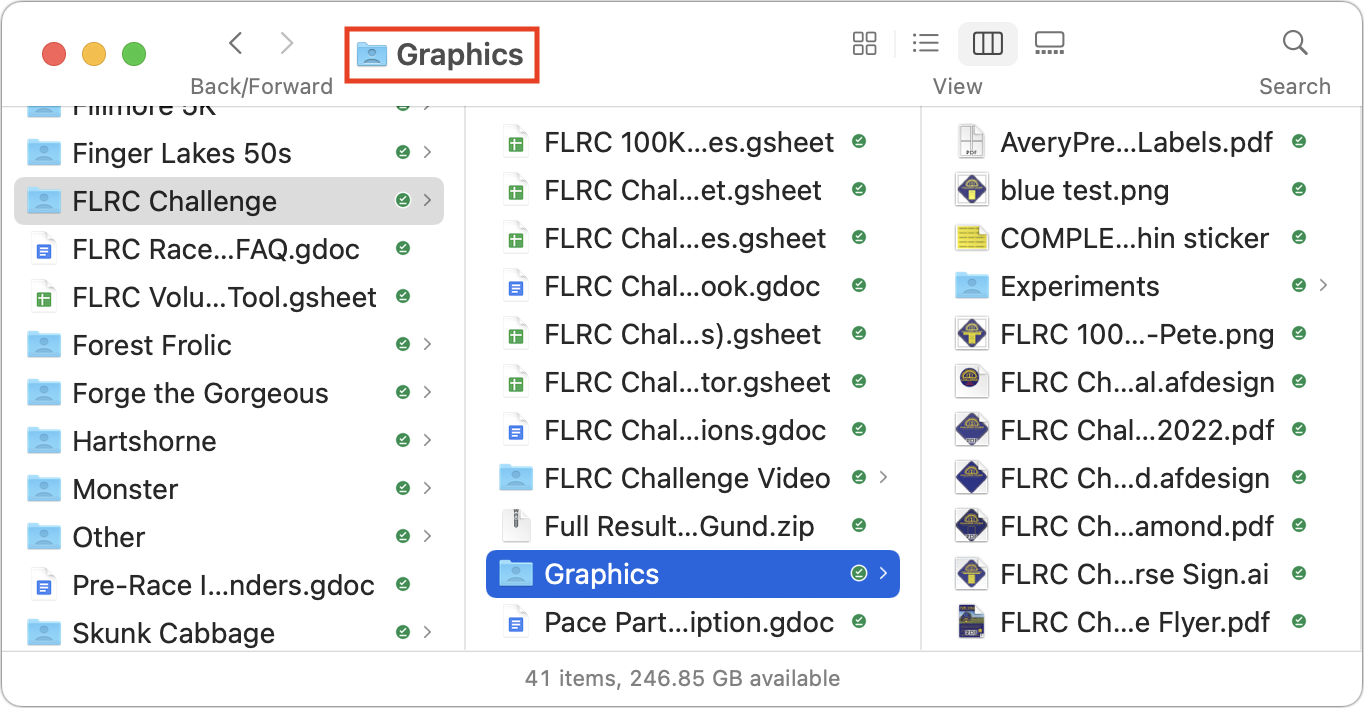
Alas, in macOS 11 Big Sur, Apple decided to hide the proxy icon by default, forcing you to hover over the window title for a second to make the proxy slide in from the left. It was discovered that this Terminal command could make the delay shorter, though hovering is still required.
defaults write -g NSToolbarTitleViewRolloverDelay -float 0
I use proxy icons a lot, but I missed the online chatter that included this Terminal command, so I’ve been quietly muttering at Apple every time I waited for a proxy icon to appear. More frustrating is that I also missed the fact that Apple silently provided an option to bring back proxy icons completely in macOS 12 Monterey. I was recently helping a TidBITS reader who didn’t know about Reduce Transparency in System Preferences > Accessibility > Display when I saw another checkbox that was new to me: Show Window Title Icons. (Reduce Transparency eliminates bleed-through color from the background and keeps the menu bar gray regardless of the wallpaper image. It’s essential for me.)

Lo and behold, selecting that checkbox brings back proxy icons to Finder windows (like the one at the top) and document windows (such as the one below) alike—no need for hovering! Life just got a little better, and had I known about this option, it would have encouraged me to upgrade to Monterey sooner.

While I’m glad that Apple added an Accessibility option to make the window proxy icons visible again, I firmly believe that hiding them by default remains a mistake. Proxy icons show what type of content is in the window, and with documents, they visually link the document to its app. The proxy icon for a Pages document looks different from the proxy icon for a TextEdit document or any other app—it’s a valuable visual hint to the user.
What Apple got right back in 1998 with Mac OS 8.5, as John Gruber noted, is that document proxy icons aren’t just a visual aid—they’re almost fully functional representations of the file. Similarly, Finder proxy icons stand in perfectly for the folders they represent, offering a handy target for operations. In classic Mac OS, proxy icons also indicated the document’s modification state. (BBEdit continues to work this way, showing proxy icons regardless of the macOS setting and dimming them when there are unsaved changes.) Form and function, all rolled up into a space-saving icon.
To be fair, apart from hiding the proxy icon and forcing users to hover over the window title to reveal it, Apple’s rethinking of how to embed functionality into document window titles isn’t terrible. Clicking the downward-pointing arrow next to the title reveals a popover that lets you rename, tag, move, and lock the file. When a document has unsaved changes, the word Edited appears under the title (and the red close button gains a black dot in the middle). So perhaps Apple’s designers thought the proxy icon was both too subtle and extraneous.

Unfortunately, the popover doesn’t provide nearly the same level of functionality as the proxy icon. Consider these real-world examples of how I use proxy icons, only one of which could be accomplished through the new popover interface:
- Navigate in Save dialogs: Drag a Finder proxy icon to a Save dialog to navigate directly to that folder. (You can also drag a document icon from a Finder window to a Save dialog to navigate to its folder and pre-fill its name in the Save As field. This is a great way to replace an unwanted file or name the new file as a version of the dragged one.)
- Enter paths in Terminal: Drag a Finder proxy icon to a Terminal window whenever you want to enter a long path without typing it. I regularly use this with
cdto change to a deeply nested directory. - Move files opened from email: Drag a document proxy icon to the Desktop to move the file there. I often do this when I open email attachments because they’re usually stored somewhere deep in a folder hierarchy.
- Attach documents to email: Drag the proxy icon for a document to an email message (or app icon in the Dock) to attach that document to the message. That’s usually easier than finding the document in the Finder or navigating to it in an Open dialog. This trick also works for opening a document in any other app that can handle the document type.
- Duplicate or alias a file: Modified drags work as well, so if you hold down the Option key while dragging a document proxy icon to the Desktop, you’ll get a copy of the file. Hold down Command-Option, and you’ll get an alias. I don’t use modified drags frequently, but they’re handy on occasion.
It seems that the only thing you can’t do with a document proxy icon is send its file to the Trash. Even though macOS allows the drag, nothing happens.
If you use proxy icons in some other way than I’ve outlined above, let us know in the comments. And if you haven’t used them in the past, give them a try!


I wonder if this was a sacrifice made to enable more density in Big Sur. I am usually a fan of higher density, but I also encounter its limits. I appreciate that for example a Preview PDF window doesn’t have a separate header holding file name and proxy icon, but instead integrates that into the usual window toolbar to save vertical space for actual content (in contrast to MS’ multiple ribbons that end up leaving 3" for actual content /smh). But a side effect of that is it’s now getting cluttered in there, especially when you have lots of widgets in that toolbar already and you’re dealing with a longer filename.
Thanks for the tip, @ace. Hadn’t noticed that option in there either. Now it’s on.
Yes—I’ve enabled this option as well. (I already had Reduce Transparency on.) I’ve never used proxy icons much, but having them visible reminds me that they’re there as a handy option.
An absolute gem of a find! I was getting frustrated with the slow “hover” workaround. Thanks for sharing.

Tip: I’ve also turned on “Show toolbar button shapes”, simply because it defines an area I can click into without having to activate a button if I was just wanting to move a Finder window. Previously I was unsure of how wide the “active” area was on a toolbar.
Old memory: I still miss Super Boomerang (last century?) which worked in with the Open & Save dialogue boxes especially for quickly locating a recent folder or file and also replacing an existing file with the same name. Monterey can do some of it, but not as well as SB. Monterey will only show Recent Places that the active application has used (not a recent place that may have been used by other applications).
"One More Thing …" (to borrow a phrase). Rarely do I use the Duplicate function in the File Menu for Apple’s apps. I constantly use the Option + Duplicate to get the Save As… option.
Bonus: Using Duplicate and Save As… does give slightly different “outcomes” as to how the file is saved and what happens with the original file. e.g. Duplicate gives you the option to “update” the original file to match the new one before closing, which can be messy and confusing, IMHO.
Super Boomerang was indeed last millennium, I think, and I missed it greatly. However Jon Gotow’s Default Folder is an indispensable replacement, which does other things as well. I struggle to feel comfortable on any Mac which doesn’t have it installed. Jon’s a Good Egg, too.
I used these -all the time- in combination with DefaultFolder to rapidly select a picture/file for uploading, etc. THANK YOU for showing how to get that badly missed functionality back!!
Thank you! I had already used this
but I had no idea about the check box in Accessibility.
Proxy icons are wonderful, and even better with a shelf app like Yoink, Dropzone or Dropover. My favorite is Yoink because it is so unobtrusive and dead simple.
Isn’t it weird how the smallest details might be the “nudge” to encourage an upgrade? I’ve been waiting to move my environment from Big Sur because little about Monterey seemed urgently useful. Since I spend what seems like half my life dragging window proxies from documents to somewhere else (sometimes to Postbox, sometimes to Evernote, sometimes elsewhere), I’ve cursed that hover so many times I’ve lost count. This just might be the compelling “feature” that gets me to install Monterey some time before WWDC and its dreaded announcement of the next major iteration of MacOS.
That last phrase probably should spur a thread of its own…
Adam, do you now recommend upgrading to Monterey?
anyone remember the name of the guy that did SuperBoomerang? I think he was a college student. First name was Hiro I think.
Hiro Yamamoto
https://tidbits.com/search/hiro
Indeed, great tip. Turned it on immediately. Another thing I hate waiting on—this one for about 6 seconds!—is when I take a partial screen shot (⇧⌘4). I usually want immediately to rename it and file it, but I have to wait for the markup(?) feature to time out before the newly created desktop icon is revealed. Would like an option to remove that delay or feature altogether.
Do Cmd-Shift-5 instead, click “options”, and turn off “Show floating thumbnail”. This will get rid of it for good with Cmd-Shift-4 as well.
Excellent! Indeed, I was mildly optimistic that someone come through with a solution to it. Thank you!
Have returned to working at the office, and decided I wanted these window favicons back dammit! Came back to TidBITS and am once again grateful for this article.