Thoughtful, detailed coverage of the Mac, iPhone, and iPad, plus the best-selling Take Control ebooks.


Pick an apple! 
 
Expand Finder Columns Quickly

Column view in the Finder is great for navigating through your disk's hierarchy, but the columns often aren't wide enough to show the full names of all the files. To expand a column to a width that will show all file names in their entirety, double-click the handle that you would normally drag to expand or shrink the column. To expand all the visible columns to that width, Option-double-click the handle.


Mactracker 6.0

Send Article to a Friend

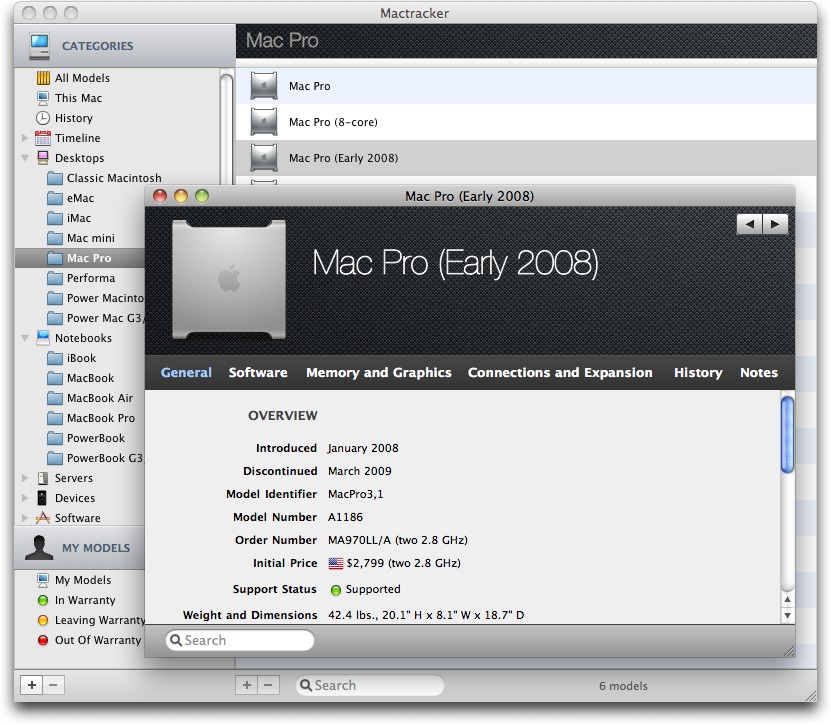
Ian Page has released version 6.0 of his encyclopedia of Apple hardware, Mactracker, adding new features and updates to its extensive database of nearly every Apple hardware product ever made. Each entry contains plenty of detail, including technical specs, the original sale price in 10 different markets, and benchmarking data (you can even compare the specifications of up to four devices). The most significant enhancement is a complete overhaul of the app’s interface, featuring a new in-window search function and “smart categories” whose contents are based on a search query. (Free from Ian Page’s Web site or the Mac App Store, 21.9 MB)


Make friends and influence people by sponsoring TidBITS!
Put your company and products in front of tens of thousands of
savvy, committed Apple users who actually buy stuff.
More information: <http://tidbits.com/advertising.html>
 

Comments about Mactracker 6.0

hjtromp  An apple icon for a TidBITS Contributor 2011-05-03 10:33
Ian Page did a great job, again!
While I like the link to manuals, the link took me to a page on Apple.com with several different manuals, meaning that I had to refer back to Mactracker for the correct one.