Use Custom CSS to Tweak TidBITS Display
A TidBITS reader wrote to us with a suggestion for the new Web site redesign: “My top suggestion of all suggestions is to make the title in all caps so your new format is easier to scan.”
There are several reasons we don’t use all caps in our headlines, ranging from odd circumstances such as “IPOD” and “IPHONE” to general readability: all caps is harder to read, and comes across online as shouting.
But that doesn’t mean our reader is out of luck. Each person has his or her own preferences, so it’s likely that having all-capped headlines would make it easier for him to read our site. In this case, he can do something about it easily thanks to the magic of Cascading Style Sheets (CSS).
All of the formatting of the TidBITS site, from the font choices to the page layout, is controlled by CSS. This enables us to decouple content from presentation, and to also make sitewide formatting changes easily. (A quick example: There was too much space below our inline sponsor blurbs, which was remedied in about 30 seconds by changing a single value.)
Now, he can’t go editing our master style sheet, but he can create his own. Web browsers include an option to reference a local style sheet that overrides whatever styles a site uses. In this case, the custom style sheet would apply only to the two styles we use for headlines (the rest of the styles work normally).
Here are the steps to create your own:
- Open TextEdit (or any other text editor), create a new document, and enter the following:
- Save the file as something like “mycustom.css” on your hard drive. (Make sure it ends in .css)
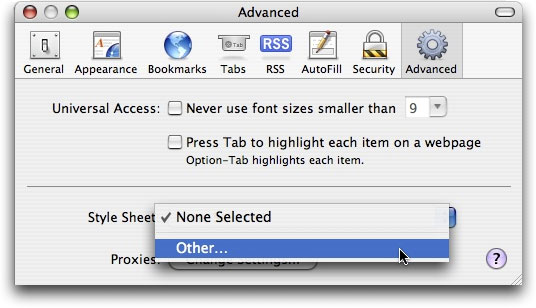
- In your Web browser, open Preferences; I’ll use Safari as an example here. Click the Advanced tab, and under Style Sheet, choose Other from the popup menu.
- Select that mycustom.css file.
.head_primary, .head_secondary {
text-transform: uppercase;
}
Now, when you reload the TidBITS home page, headlines appear in all caps.
Thanks again to everyone who has commented and provided feedback on our new redesign.