Do You Use It? iPhone 15 Pro Action Button Struggles to Find Its Purpose
In our most recent Do You Use It? poll, we asked readers who own an iPhone 15 Pro or iPhone 15 Pro Max if they used the Action button, and if so, for what. Remember, the Action button replaced the Ring/Silent switch on earlier iPhone models and defaults to toggling Silent mode but lets users customize its functionality if they prefer. I was initially curious about Action button uptake and usage because I’ve had trouble working it into my everyday iPhone habits—was I just too set in my ways compared to others? Two changes for the iPhone 16 lineup make the question even more timely. First, all iPhone 16 models gain the Action button, so it will become available to far more iPhone users than last year. Second, Apple also added the new Camera Control to the entire lineup, making it unlikely that iPhone 16 users would associate camera functions with the Action button.
Although the poll received relatively low participation because it was limited to TidBITS readers who own one of the iPhone 15 Pro models, the results still suggest that the Action button hasn’t been a runaway success. The most common use was to recreate the function of the Ring/Silent switch, garnering 33% of the votes. Even then, some people aren’t happy with the Action button as a replacement for the Ring/Silent switch because you can’t tell at a glance which state it’s in. (iOS does provide Silent mode feedback in the Dynamic Island, but if you’re in a theater, you may have to press the Action button twice to be sure it’s muted. Or you could look in Control Center.)
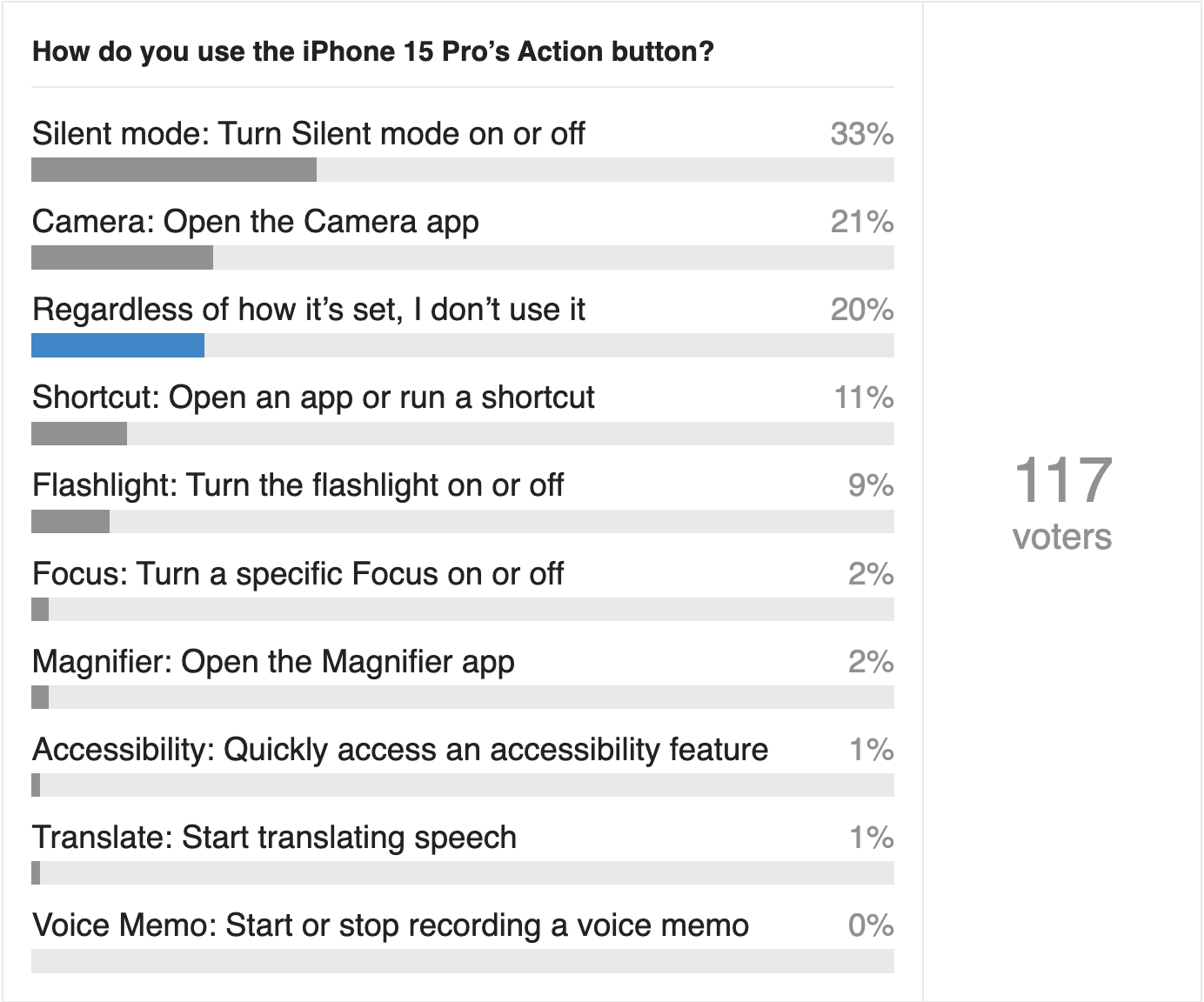
Another 21% of respondents use the Action button to open the Camera app, which I doubt iPhone 16 users will do, and 20% said they don’t use the Action button at all, like me. That’s a total of 74% who either use the Action button like the switch it replaces, don’t use it at all, or use it in a way that Apple is, in essence, deprecating in future iPhone models by adding the Camera Control.
I was encouraged by the 11% of respondents who use the Action button to trigger a shortcut. That’s taking advantage of the Action button’s flexibility to personalize the iPhone for that precise task that improves the overall experience. The 9% who use the Action button to control the flashlight remind me of the morose robot Marvin in The Hitchhiker’s Guide to the Galaxy. “Here I am, brain the size of a planet, and what do they use me for? A flashlight.”
The remaining options are vanishingly little used, which isn’t surprising. Focus is an overengineered solution still searching for its problem. Although the Magnifier app is wonderfully helpful, few people need it regularly. Although it’s great that Apple provides access to a long list of accessibility features, most of them probably don’t need toggling throughout the day. I could imagine connecting Translate to the Action button while on a trip to a country where I don’t speak the language, but how many people rely on frequent translations every day? Finally, it seems that Voice Memos don’t get much use on an everyday basis.
I’m sad that the Action button hasn’t been more of a hit because it seemed like the sort of thing that power users would leap to use. I’ve been trying to figure out why I haven’t taken to it myself, and I think it comes down to two reasons:
- The iPhone is a highly visual device with most controls defined by software and appearing onscreen. Before the Action button, the only physical controls were the side button (the top button before that), the volume buttons, and the Ring/Silent switch. Their “hidden” actions generally take place outside of iOS apps: waking and sleeping the screen, changing or muting volume, activating Siri, opening Apple Pay, powering the iPhone on and off, taking a screenshot, activating Emergency SOS, and force-restarting the iPhone. I’d argue that Apple has trained us not to think about attaching an app-related function to a physical button, and the other buttons already handle most of the extra-iOS features we need.
- If we’re to become fluid with the Action button, it needs to trigger an action we will invoke regularly, but we already have longstanding muscle memory for such actions. I tried setting the Action button to open CARROT Weather, which is one of my most-checked apps, but I find myself preferring to tap the widgets I’ve placed on the Lock Screen and Home Screen. I could remove those to force myself to use the Action button, but I have nothing better to do with those widget slots. In essence, the Action button has to compete with the many other shortcut options Apple provides in iOS.
Some people have suggested that the Action button’s location can make it difficult to activate, while others expressed concern that it could be activated inadvertently in a pocket. Apple may have required that we press and hold the Action button to reduce the likelihood of accidental presses, but that adds friction to every invocation of the Action button, making it less satisfying as a shortcut. The press-and-hold requirement and associated delay would seem minor, but with user interfaces, small things can have outsized consequences.
I’m looking forward to seeing if Apple has tweaked the feel of the Action button on the iPhone 16 Pro. I could imagine a future iPhone taking the Action button virtual, much as Apple trackpads simulate movement and feedback with the Taptic Engine rather than having physical switches.


This is probably a key issue. In the past, before Apple allowed widgets and wide customisation (even more so with iOS 18’s Control Centre), the Action button would likely have found widespread usage. But there are so many ways to create convenient shortcuts now. Thankfully
I find that I’m triggered by visuals, so once I pick up my iPhone, I see the widgets and it’s easier to tap them to reach around for the Action button and accidentally hit the volume button and try again and then get the Action button, which I have to press and hold in comparison with a simple tap on the widget.
While I partially agree with some of these points, I’m still really perplexed at such apparent low usage, “I really like it” rates.
I’m definitely not a power user. But I find the Action Button to be the quickest, least frustrating way to open the several items I use on a routine basis.
I’ve never had a problem with unintentionally activating the button because of the press-hold delay; the button falls perfectly under my left thumb (on this non-Max iPhone 15 Pro); the button activation thru my 2 cases is perfect (maybe better than w/out a case?..because the case covering makes the button larger and easier to discern).
Finally I super appreciate I don’t need to swipe, scroll in any direction or hunt around to find my several items - or even remember which sub folder they might be in. I can be inside any app or task and the simple button push takes me directly to what I want.
I do feel that Apple bears some blame here. They don’t promote or advertise it correctly enough, and they should provide more obvious support, instructions, links and examples for making the most of the button.
By far the best use of this button, IMHO, is toggling the Orientation Lock. Turn the phone and the current screen rotation mode isn’t to your liking? Simply hold the button to lock or unlock screen rotation. I use this multiple times per day and have for many months.
Try it out and post what you think!
Doesn’t the survey show that 8 out of 10 people do find it useful? I wouldn’t say that’s a particularly low percentage for a new feature.
80% of respondents use it, but 33% use it for the same function as the switch it replaced, which, to my mind, doesn’t equate to finding it useful. Another 20% use it to open the Camera app, which is a real use but one that will disappear entirely for iPhone 16 users. It just feels weak.
I think that’s the wrong way to look at it. A big shift will take time to take hold. Most will use it as they have so far. Then people will start broadening out.
Reminds me of the Touch Bar. A select few loudly shouting how this is the future, while the vast majority couldn’t care less about it. I have no strong feelings either way, but I do find it disappointing that this is apparently the kind of “feature” Apple tries to talk up big time when it comes to iPhone innovation.
You can still assign the action button to the camera on the iPhone 16 family. Just because the new camera button is there, it doesn’t mean that people can’t use the action button instead.
From reading John Gruber’s review, if the 16 series screen is locked a single press of the camera control button will not open the camera - it wakes the screen and needs another press of the button to open the camera. The action button, though, will open the camera even when the screen is locked.
We’ll have to revisit this poll in a year and see.
Or it’s like the trackpad, which had similar vibes.
I see what you mean Adam but I will be using it on my 15 Pro as a camera launch button for years to come no-matter what control inputs future iPhones have and I’m delighted to have that choice.
I think modern car interior mistakes have confirmed the value of physical controls for frequently used actions.