Yet Another Story of an iOS Update Silently Changing Settings
Ann Garretson, an old friend from our Seattle days, wrote to me recently with what initially sounded like an utterly inscrutable problem. I knew Ann from Seattle dBUG, and she’s married to Ralph Sims, who provided my first UUCP connection in Seattle in 1991 and later co-founded Northwest Nexus, the ISP that offered the world’s first flat-rate Internet account for readers of my Internet Starter Kit for Macintosh book. So when it comes to Apple devices and networking, she’s far from a novice.
Ann’s problem appeared after she updated to iOS 26.4.1: Safari on her iPhone 16 Pro failed to display an IPv4 address and hostname, and since her server required both, connections were timing out. However, if she switched to Firefox or DuckDuckGo on the iPhone, connections to her server worked fine. So did Safari on her Macs and iPads. When iOS 26.4.2 came out, installing that made no difference. To illustrate what she was saying, Ann suggested that I visit MYIP.MS, which shows IP address information.
With a variety of Apple devices at my fingertips, I visited MYIP.MS from different browsers, and she was correct—on my iPhone, Safari didn’t show an IPv4 address or hostname (left), but Arc Search and other browsers did (right). However, I saw the same behavior on my iPad, though not on my Macs. What could be going on?
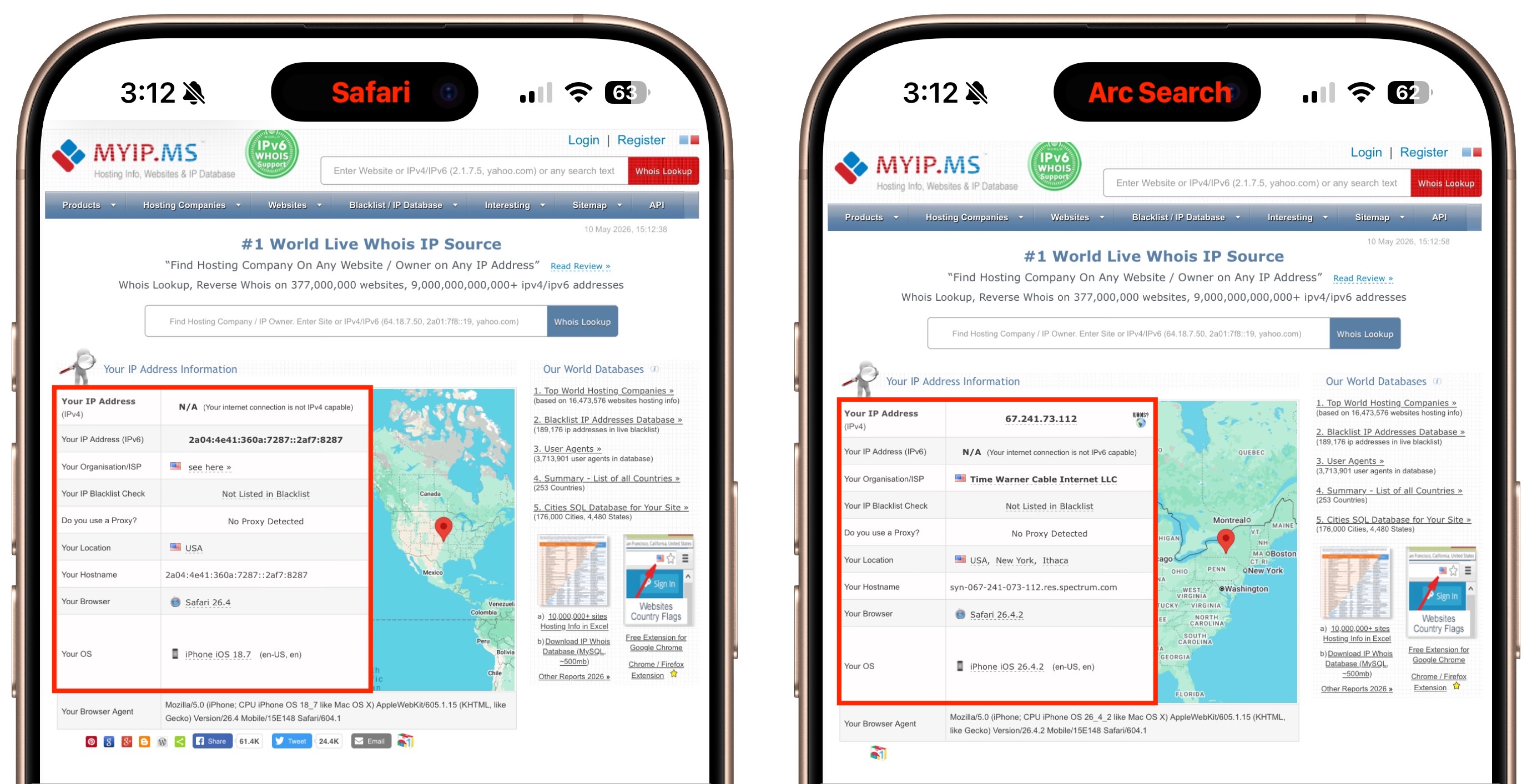
Then the lightbulb came on—there is one scenario where networking in Safari is completely different from all other browsers: iCloud Private Relay, which I’ve tangled with before (see “Solving Connectivity Problems Caused by Interlocking Apple Privacy Settings,” 20 June 2022). Once I turned iCloud Private Relay off on my iPhone (Settings > Your Name > iCloud > Private Relay), MYIP.MS properly reported an IPv4 address and hostname.
(Checking a few other IP lookup sites suggests that Ann’s issue may have been related mostly to the hostname; some sites detected a proper IPv4 address when iCloud Private Relay was in use, but fell back to either the IPv4 or IPv6 address instead of the hostname. Beware that these sites have a lot of ads!)
I suggested to Ann that iCloud Private Relay might be the culprit, and she quickly wrote back to confirm that I was correct. Immediate problem solved, and happily, it wasn’t an obscure bug in iOS or Safari.
But here’s the thing—Ann never enabled iCloud Private Relay, which was why she didn’t think of it as a possibility. During the iOS 26.4.1 update, some gremlin must have toggled iCloud Private Relay on. (It was so tempting to write “goblin” there—see “ChatGPT’s Goblin Obsession Evades OpenAI’s Fixes,” 5 May 2026.)
Unfortunately, such reports are all too common. Although it’s easy (and tempting) to be angry at Apple for randomly changing settings, the reality is undoubtedly less simple (and less satisfying). With more significant upgrades, it’s more likely that Apple updates are changing the underlying foundation: old preferences may be converted to new formats without a one-to-one mapping, unchanged defaults may be replaced with new values, and security rules may be tightened.
Even small updates can restart services, repair damaged state, reapply synced settings, or change the timing of background processes. So a setting may appear to change because the update caused some system service to reassert a value that had previously been stale, stuck, or inconsistent.
I’ve been experimenting with getting Claude to write a script that records the before and after states of any accessible macOS settings, compares the two files, and reports on what changed. Early testing looks promising, so I’ll keep working on it to see if it’s the sort of thing that can be packaged up in a useful way. Unfortunately, iOS sandboxing and security precautions would seem to preclude anything similar on the iPhone and iPad unless, as one commenter suggested, an iMazing backup to the Mac would allow a script to read all the necessary plist files.


I wonder if it would be possible to make that analysis tool work with iOS as well, if you do it by scanning a backup made onto a Mac. I’m thinking about how apps like iMazing can view the files in an iOS backup.
I assume iOS uses plist files for preferences, just like macOS. So I’d like to think that a backup would make them accessible.
But it can still be a challenge. For instance, if a key is missing, then an app will treat it as the default value. So if the default changes (e.g., as a part of a system or app upgrade), the active configuration will change even though none of the configuration files have changed.
It would be handy to have a list where people have discovered a “silent” change to an important setting. For example
iOS 26.4.1 >> Private relay turned on (iCloud+ settings)
iOS 26.1 (?) >> Automatic iOS updates turned on (General/Software Update)
I’ve been advising my students to avoid Safari on the Macs on campus, sites failing to load became a real issue. I had always attributed this to the blocking of trackers triggering some security bells on the College network.
myip.ms is not the best for detecting IP address. I agree that it does not show IP4 address - that would seem to be shortcoming of the web site and not a shortcoming of Safari. Also it reports my IP6 as being Cloudflare in USA somewhere.
Instead use https://whatismyipaddress.com which does show IP4 as well as IP6 address. Whilst they may be Cloudflare address, it correctly reports that I am using iCloud Private Relay and that those addresses are in Australia.
I use iMazing to backup my iPhone. Searching in a backup finds 3,729 plist files. So it would certainly be possible to compare those plists before and after an iOS update. Even if we ignore preferences in the AppDomain (about 50% of mine), I don’t how we would go about deciding what are important differences.
That’s all true. I wasn’t commenting on how easy this is to do in general, but just on how a process designed to work for macOS might possibly be extended to iOS.
It would be fun to see such a diff. And only then worry about whether it’s worthwhile to track them or not.
It makes me miss my old Silicon Graphics computers, which ran an operating system that was very careful about changing preferences. When a software update changed a preference, a copy of the old preference file usually got stored with a standard suffix, *.0, IIRC. It was very easy and convenient to review changed settings after an update, rather than being caught by surprise later.
Interestingly, this suggests that @anngarretson’s problem was more related to the hostname than to the IPv4 address. When using this site, it does show an IPv4 address, but when you click Show Complete IP Details, it shows the IPv6 address rather than a hostname.
Entirely conceivable, from what @gilby101 said. Right now, the script is doing pretty well at detecting changes; the hard part is filtering out noise (a LOT of timestamps and other chatter) and identifying the changes in a human-readable fashion. Claude does pretty well at that when I feed it a diff, but I’m having trouble figuring how best to get it to do that for changes that I haven’t triggered on my own system yet.
This makes me wonder if one of the ways this script could work is to run every day at the same time, compare against the previous day, and then write the changes to a log file of sorts. Logs are notoriously unreadable, so I’d like it to be as human readable as possible.
I was at Syracuse University for graduation this weekend, and I had my phone out to take photos probably and I said something with the word Syracuse in it…. which sounds like Siri-cuse…. and Siri came up. I’m really sure I had that feature turned off, so I think the iOS 26 upgrade turned it on.
At some point (not too long ago), Apple changed the default so Siri will activate if you just say “Siri” instead of “Hey Siri”. I found this very annoying - too many false-positives.
Fortunately, you can reset the behavior to require the two-word activation string. Settings → Siri → Talk to Siri. Change the setting from
"Siri" or "Hey Siri"to just"Hey Siri":My spouse works with globally based teams, including some in India. So we often get continuous Siri interruptions whenever a colleague named “Surya” (soor-ee-ah) is on a Zoom call!
;-)
This is because (typically) providers do not supply IPv6 reverse DNS entries – these answer with the the hostname assigned to an IP address only if there is an entry in DNS.
For example, Comcast automatically creates a PoinTer Record (PTR) for the customer gateway connection to the Comcast’s Wide Area Network (WAN) as part of DHCP assigning a single IPv4 address of the customer gateway. This is a Comcast internal process which also creates the corresponding IPv4 PTR record with a somewhat cryptic name intended to support Comcast management of the connection and is very nearly permanent. The customer gateway directs incoming IPv4 connections to this address to internal LAN hosts using Port numbers as a sub-address – Port Forwarding.
In contrast, the IPv6 WAN address of the customer gateway is NOT made public in global DNS as it is transparent to host connections using IPv6 – the host IPv6 Global Unicast Addresses (GUAs) are allocated locally using a delegated IPv6 prefix for a pool of IPv6 addresses received by Prefix Delegation. This is considered a subscriber issue since there are at least three different ways individual hosts may receive addresses and there is today no economical technical standard solution for the service provider (ISP). Note that the recommended minimum IPv6 delegated prefix supplies GUA address space for 256 Subnets (LAN segments), each with 2^64 addresses. Providing DNS record capacity for (theoretical) 2^72 records or more is not an idea of interest to ISP management. This make sense as IPv6 addresses are assigned by local mechanisms which are effectively transparent to most subscribers. Where IPv6 hosts need DNS address records, a Dynamic DNS client on each local host can connect to provider such as dyndns.com, by subscription, of course.
The way I used to manage it on the SGIs was to run the
diffcommand against all of the new “*.0” files and output that to a report. It was easy to execute, but since there was no standard format for the settings files, reading the report could be a little quirky.I guess one of the challenges with Apple plist files is that they can be XML, JSON, or binary formatted (not to mention legacy NeXTSTEP formatted), so reporting plist changes can get pretty complicated.
Just to add a quick note for those that use iCloud Private Relay, in Safari on iOS using iCloud Private Relay you can tap on the icon on the left-side of the address bar, then the three-dot control on the bottom-right, and choose “Show IP address” to temporarily turn off iCloud Private Relay for that site - Safari will refresh and pass along your IP address to the website, rather than go through the relay.
It’s similar on iPadOS, though, of course, by default the address bar is at the top of Safari. And in MacOS, that icon is on the right side of the address bar rather than the left.
I havn’t had any issues like this.
However, out of plain curiosity and since I also never enabled “iCloud Private Relay” I checked the settings on my two iPhones - now both on iOS 26.4.2 and having automated updates activated.
And “iCloud Private Relay” was still not enabled.
So this issue is perhaps not entirely general
In Denmark we do not have gremlins - Instead we have “Nisser” and they are generally helpful little creatures - if sometimes sometime prickly if you forget to honour their attribution
Mac, iPad, and iOS, in my experience, routinely change user settings during updates/upgrades. Not only that but signing out and back into the Apple Account, last time, turned every iCloud option on, despite my previous settings.
Caution: rant > It’s a real annoyance and getting worse with the increased pace of updates, and complexity of the Settings. Every update it takes 30-45 minutes per device to review every level of every setting to see what Apple has disrespected and changed. < rant over.
I had not had problems with the last update, but I did check this setting on my phone after reading this article and it had not been altered. However, this type of article is one of the main reasons I’ve read Tidbits faithfully for 20+ years. Thanks Adam.
I’m wondering if this is an example of “it’s not a bug it’s a feature” - Apple is prettry aggressive in security first, User second. And like the old “check your DNS” days of network issues - check your Private Relay. I find it has issues with Public-Wifi and when that is intermingled with dodgy cell connectivity. -which ,in that case, I turn off wifi - this happens at medical care facilities a lot, in my experience.
Apple changing settings spontaneously has been a thing for at least 20 years, particularly during software updates (both ios and macos). Bluetooth would routinely be turned on during the update process on the mac, only stopping maybe 4 or 5 years ago?
I have turned game centre off at least 20 times on iphones in 12 years, without ever once turning it on.
All of this is why I don’t store my health data (blood type etc) in my phone… it would be a shame to die because my blood type got changed and a hospital emergency transfused the wrong type.
Still does, alas.
One setting which has always changed with iOS updates, and which repeated Feedback to Apple has not fixed, is in Settings > Cellular > Cellular Data Options. I always keep my connection downshifted to LTE (which yields better connectivity given the weak 5G on my network) but every time I update my iPhone Apple changes Voice & Data back to 5G.
The status of iCloud Private Relay can also be influenced by individual WiFi network preferences.
But I’ve not experimented to see how the “master” setting in the iCloud settings panel interacts with those of the individual networks.
Does it actually just change the setting of the current network? Can one have it default enabled, and disable specific networks? Can it be default disabled and enabled on specific ones? Is there a hidden “null”/no setting, that is replaced with an explicit setting if the toggle is operated?
Plus, of course, sometimes it will disable itself if it detects a problem in its actual operation; and it can also be disabled if certain DNS lookups fail (A Pi-Hole’s default block list will disable it: ironic, for a tool people use “for privacy”).
Claude has taken this completely in stride, even venturing into SQLite databases as necessary.
No, it definitely isn’t. That’s part of what’s frustrating about these settings flip-flops—they hit seemingly randomly, so individuals never know what happened.
They sound far more pleasant than our gremlins. Or goblins!
Just updated both my iPhones to iOS 26.5 with no iCloud Private Relay problems. So the Gremlins or Goblins have not bothered me yet. Our Scandinavian Nisser may be protecting me?
But for those having the issue it surely must be frustrating.
Just remember Apple - as must as we would like it - is not always faultless. Nor is other OS suppliers. But looking at the bottom line Apple is not too bad thanks to some very active user communities (like TidBits )
)
With iCloud Private Relay active on my Mac running Sequoia 15.7.4, I received quite different results when checking my IP address via two sources during the same session.
I’m posting this to add data points and demonstrate the variability of how our devices are perceived by servers at large. Also to share the BrowserLeaks site, which offers a bunch of useful browser security testing tools all free of charge, adverts, trackers, or up-selling.
This isn’t exactly the same thing - there wasn’t a changed setting - but I installed iOS 26.5.1 last night, and discovered on signing back in after the update that all of my pinned Messages conversations were unpinned, and one that I didn’t pin was now the only pinned conversation. Fun!