Beware Greeting Card Scams from Trusted Senders
“You’re invited!”
Not really, but that’s the message scammers are now using to steal users’ login credentials with a greeting card scam that’s making the rounds. Here’s how it works.
You receive an email from a friend, someone who has you in their contacts, inviting you to a party. The message appears to come from an invitation site like Paperless Post or Punchbowl, and there are few details beyond a suggestion to open the invitation. It’s a legitimate message, in the sense that it really does come from your friend, whose account has been hacked. But that’s all that’s legitimate about it.
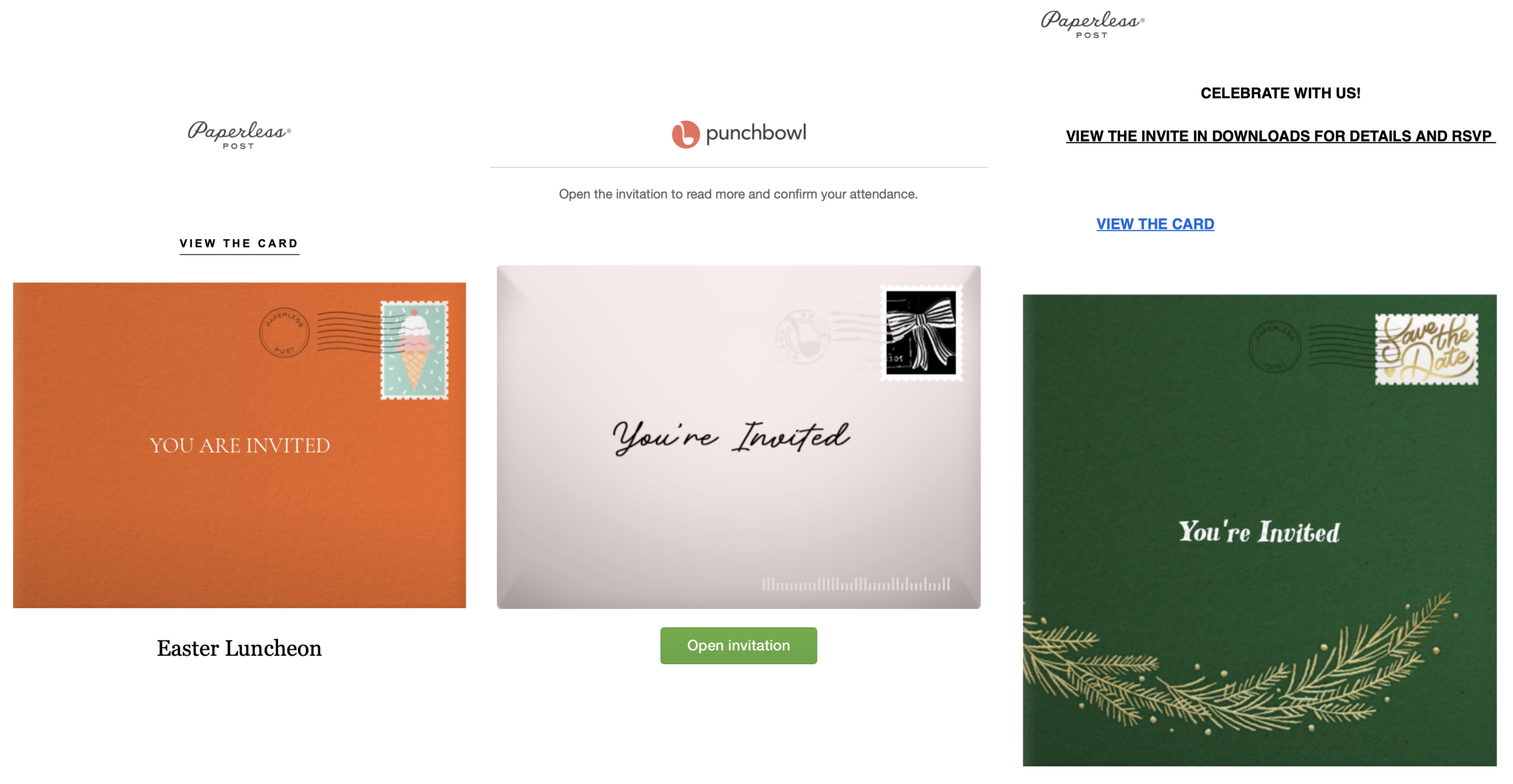
If you click the View the Card link or Open Invitation button, you’ll immediately be sent to a site that asks you to log in with your email credentials. Provide your username and password, and your email account will be the next one compromised. Once the scammer has access to your email account, they can also get into financial and other confidential accounts that allow passwords to be changed with email verification.
How One Experienced User Got Caught
I’ve seen three of these scams recently, and while all three came from intelligent, experienced Internet users, one was even from an old industry friend who was professionally mortified to have fallen for it (the middle screenshot above). He explained that four factors allowed the social engineering attack to succeed:
- He was expecting an invitation from his sister, who’s having a significant birthday next year. The phishing email came from her account, so it seemed entirely plausible.
- He and his partner were having a calendar meeting about their plans for the next few months, so the phishing email arrived at the “perfect” time. They were both eager to act on the invitation so they could plan around it.
- Because they were in the middle of planning, he hurried through the process to learn more and respond. In his rush, he ignored warning signs like the non-Punchbowl URL, the slightly funky-looking email, and the solicitation for email credentials. Like so many people, he’s become accustomed to entering his username and password on certain websites and didn’t take the time to question it.
- He was using his iPhone and either didn’t know or had forgotten that you can touch and hold any link in Safari to preview it. On his Mac, he likely would have hovered over the Open Invitation button, seen the fake URL, and stopped.
How Can You Identify and Avoid Greeting Card Scams?
The good news is that these scams are easy to spot if you take the time to look carefully. Red flags include:
- Does the invitation make sense? Two of the three I received were from people on the other side of the country, so being invited to an Easter luncheon seemed unlikely. The third one was sent to a mailing list where the sender wouldn’t have known most of the subscribers, so that was also implausible.
- Do you have to click to see any details about when the event is, where it’s being held, and so on? Legitimate invitations should make at least some of that information available up front.
- Do the links go to any site other than the actual greeting card provider? Before clicking, preview the URL—on a Mac, hover over the link; on an iPhone or iPad, touch and hold it.
- Are you asked to sign in with your email address and password? A greeting card service might ask you to create a service account or sign in to RSVP, but no legitimate service will ever ask for your email password.
The most important advice I can give is to enable multifactor authentication for your email account, which will stop takeovers in their tracks.
Otherwise, all you can do is slow down a little, pay attention, and exercise some caution, which is solid advice for all online activities these days.
After initial publication, a rep from Paperless Post provided three ways to verify a legitimate Paperless Post invitation:
- It will always come from a @paperlesspost.com email address
- It will only link to paperlesspost.com
- It will never ask you to log in or download anything to view a card
Plus, if you get what looks like a suspicious Paperless Post invitation, you can forward it to [email protected] so their team can investigate it.
Paperless Post recently posted about this, and Punchbowl also offers advice on detecting scams.
How Can You Help a Friend Whose Account Has Sent a Greeting Card Scam?
Unfortunately, the more serious damage to the sender has likely already occurred, but it’s still important to alert them that their email account has been compromised and to urge them to change their password immediately.
If possible, do that via text message, phone call, or an email to a different email address or to a friend or family member who might be able to get in touch more directly.
What Should You Do If You Fall Prey to a Greeting Card Scam?
First off, no judgment here. As with my industry friend, if all the factors align, anyone can be fooled. It may seem as though he was just unlucky, and while that’s true, I think many of the necessary factors can align more often than we expect. That’s why the scam works.
If the compromised account was a Gmail account, immediately go to your Google Account’s Device Activity page. Sign out of any sessions you don’t recognize. This kicks the scammer out of your account before they can do further damage. (Other email providers may have equivalent security pages.)
Next, change your password and enable multifactor authentication. Be aware that changing your password doesn’t automatically revoke access that the scammer may have granted to a third-party app while they were in your account. Gmail users should go to the Third-Party Apps & Services page, review the list carefully, and remove any unfamiliar entries.
Regardless of your email provider, review your email settings to see if the scammer set up mail forwarding or filters that would redirect your messages. If so, delete them immediately.
It’s worth looking through recent sent and received emails to see if there’s any indication of which accounts the scammer may have targeted, but they likely deleted such messages.
You could try sending an email to all your contacts to alert them not to click the greeting card scam link, but if you have hundreds of contacts, it likely isn’t worth the significant effort involved. If you do this, it’s probably best to send in BCC’d batches of 10 to 20 at most to reduce the risk of triggering spam filters.
Now comes the tedious part. You’re going to have to log in to every account in your password manager, starting with the most important (financial, government, tech giants like Amazon and Google, and so on). If your stored password doesn’t work, change it immediately, then review account activity to determine the ways it might have been compromised. Also, turn on multifactor authentication for any accounts where it’s available.
If that sounds awful, consider it incentive to exercise caution out there!


Adam, could something similar happen with ecard sites like 123 Greetings, Blue Mountain, Hallmark, etc.?
I find MS Teams invites annoying as they don’t give crucial meeting details (may because I am using Apple Mail). It seems all too easy for a hacker to prey on this oversight.
Tip for Gmail users who have been compromised: after you get back into your account and change your password, run the Gmail Message Recovery Tool. (Google’s description for this tool: “Recover your emails that might have been deleted due to someone accessing your account without permission.”) I used this on my father-in-law’s Gmail account after someone accessed his account through the invitation scam, and I was able to trace the scammer’s steps of accessing his American Airlines AAdvantage account, creating an AAdvantage Shopping account, and attempting to use his miles to purchase a gift card. American flagged the transaction as fraudulent, thankfully. But by recovering these deleted messages afterwards, I was able to know for sure that this was all the scammer had accessed, so I could reassure him that his other accounts were ok.
I recently had a scam attempt from a trusted sender, my university room-mate of nearly 50 years ago. He emailed that he was trying to buy an Airbnb gift card for a friend. He was finding it hard to order it at the site and wondered if I could place it on his behalf. As he’s not well and his hands shake I agreed. Using a VPN I connected to the gift cards page at airbnb.com to check what information I had to provide in order to place an order and emailed my findings to my friend.
He replied from his usual address. The spend requested was funny, worse was his proposed signature which took the form ‘firstname familyname’, his normal style for a friend is just ‘firstname’. I decided to wait a few hours. During that wait he emailed from a gmail account to advise that he had been hacked and that I should use that gmail account in place of his usual trusted address. That address had no numbers appended to the name. I found this suspicious for none of my contacts who use gmail, has an address without numbers. To test my suspicions I replied to this new address with a question to which only he and I knew the answer. No answer came back.
Clearly my friend has a serious problem. As I can’t get in touch electronically, I have had to resort to the classic route - real mail - in which I’ve included a link to Adams’s article.
Not quite on-topic, but related to discerning email from fake accounts.
Sorry to be dense, but I don’t follow. My gmail account has no numbers anywhere. Is this because it’s old or did I misunderstand something?
Same here. In fact, none of my dozens of email addresses over the years has ever had numbers.
If the name I want isn’t available, I change my name until it is.
– Mikel Shmit
Obligatory numbers in email addresses! CompuServe flashbacks…
;-)
CompuServe’s numeric user IDs was 100% the result of the DEC TOPS-10 operating system running on the DEC PDP-10 mainframe that hosted the service. Its user IDs all took the form of two integers, represented as two octal strings with a comma between them
Each user/mailbox on CompuServe was effectively a TOPS-10 user. The operators at the time saw no need to create more user-friendly aliases, so the OS’s naming conventions propagated to what users saw.
See also: TOPS-10: Users · Time Reshared
Yes - I knew it was off-topic, I was trying to emphasise caution even when responding to a trusted sender when the topic is off-centre. When I registered a gmail address many years ago, just plain ‘charleswj’ was not acceptable as it was already taken. I added some numbers and all was well. And as I wrote, all my gmail contacts have numbers added to their chosen name. I guess that yours is one of the originals - might have antique value?
I really don’t understand this scam, why would you ever give your email credentials except for reading your mail at you email provider?
I believe that a lot of scams, especially phishing and social engineering scams, prey on the human tendencies to trust, to be greedy, or to revert to the fight-or-flight reflex in stressful situations.
In addition to the emotional angles, social media and networking sites have trained people to allow access to their email accounts and associated address books. Some banks, stock brokerages, and tax preparation services have also helped to make providing sensitive login information feel normal by offering “link your accounts” and direct deposit features. And let’s face it, a lot of us read emails and texts while we’re sharing our attention with other activities.
Absolutely. There’s nothing legitimate to the scam content, so they can impersonate any legitimate site they want.
Oh! I didn’t know about that—very cool!
Adding numbers is just one way of making a Gmail address unique. You could probably have gotten [email protected] or [email protected] at the time.
My GMail account is my frist and last name, so there was never a problem of a conflict there.
But my preferred handle, Shamino is not unique. I frequently find that it’s already been taken when creating new accounts. Suffixing low numbers (1, 2, 3) often fails, having been taken by others. But it seems that nobody chooses 0. So I have several accounts named “shamino0”.
But adding periods is not a way to make GMail addresses unique! In GMail [email protected] and [email protected] are the same address, as are [email protected] and [email protected].
This is annoying, and a reason I get other people’s email by mistake.
Some years ago, I worked for a company that gave each employee an internal user ID that consisted of seemingly random characters to make it harder to crack into sensitive systems. For my truly sensitive accounts, e.g., financial accounts, I’ve found it useful to adopt the same practice.
For example, I’ve used an email address of the form [email protected] from a trusted email provider exclusively for online banking, etc. I’ve received essentially zero spam at that address, despite using it for nearly a decade. I also protect the email account with multifactor authentication.
Are you certain? I have a username with a dot in the middle @ gmail. Never had a problem. Should I be concerned?
I’m sure GMail ignores the periods, so that mschmitt and m.schmitt are the same address. Whether that causes a problem just depends if if there’s someone trying to use the invalid address as if it is their own. But I suppose that’s a risk for any email address.
I frequently get email sent to my gmail account that is clearly not meant for me. IIRC this dot stuff is usually the cause, but sometimes someone has just signed up for something with my gmail address whether intentionally or not.
In general, dots (“.”) are ignored in Gmail addresses.
There is one major exception to this: Dots have meaning in Google Workspace Gmail addresses using custom domains. For example, [email protected] and [email protected] are different accounts.
I have madmacs0 accounts to go with my avatar.