Release Your Inner Art Director with Improved ChatGPT Image Generation
I’m always impressed by people who can draw, paint, or create images digitally. At the same time, I’m quietly annoyed when they insist that anyone can learn to do it. That may have been true for them—they had the time, inclination, and mental wiring—but not everyone does.
Perhaps because of the aphantasia that prevents me from mentally visualizing images, I have trouble coming up with ideas for what an image should look like. Conversely, once I’m looking at an image and can talk about it, I have no problem saying what I like and what I don’t. I’m lousy at creating images, but I feel like I’m pretty good at art direction.
As a result, the recent improvements in ChatGPT Images 2.0 have made it far more useful to people like me, who are better at giving direction than creating images from scratch. I have no desire to become an artist or replace one, but now and then, an image would be helpful, and that’s far more possible than in the past.
ChatGPT’s image-generation tools are available on free accounts, but with tighter limits. ChatGPT Plus subscribers get higher usage limits and access to image generation with Thinking, which can improve results for more complex or instruction-heavy images. If you haven’t played with image generation before, it’s worth reading OpenAI’s FAQ about images in ChatGPT and the OpenAI Academy article about creating images. Per OpenAI’s terms, you own the images you create, though you should disclose AI involvement where required by context or law.
Generating Conceptual Images with Prompting Help
Recently, I was preparing a talk on managing shadow AI for the ACES Conference and wanted some images to break up my text-heavy slides. I subscribe to iStock for the featured images I include in our syndicated TidBITS Content Network posts, but I have often found it difficult or impossible to find stock photos that illustrate technology concepts that have little connection to the real world.
For instance, I wanted something that would illustrate a slide discussing Ethan Mollick’s concept of the “jagged frontier,” which points out that AI is superhumanly good at some tasks while simultaneously being laughably poor at others. After some back-and-forth, ChatGPT came up with the image on the left. Similarly, how does one illustrate the concept of “shadow AI,” the unsanctioned use of AI tools without IT’s knowledge or approval? (Shadow AI can lead to data leakage, security vulnerabilities, regulatory noncompliance, and reputational damage.) To that end, I worked with ChatGPT to develop the image on the right.

One important thing to note up front is that I also asked ChatGPT to develop the prompts for these images using the text of my slides and, in the case of the jagged frontier image, Ethan Mollick’s explanation of what he meant. (Yes, I used AI to figure out the best way to talk to AI.) That prompt assistance was key, since I would never have thought to write a prompt like this:
Create a portrait 4:5 illustration of a traveler moving along a winding path through a landscape that represents the jagged frontier of AI capability. The left side of the path should be a futuristic, gleaming city with glass towers. The right side should be steep and irregular, with lots of broken bits and badly engineered machine parts. The traveler moves cautiously, testing the route because the boundaries between reliable and unreliable sections are abrupt and mysterious. Subtle, realistic editorial style, muted natural colors, no text.
Modifying Specific Portions of Images
Part of what’s new is that ChatGPT can now change specific portions of an image much more reliably. As an example, I asked it to make me an image with this prompt:
Create a wallpaper image for my 27-inch Studio Display that’s an abstract impressionism take on a collage of Macs throughout the years from the original Mac to the MacBook Neo.
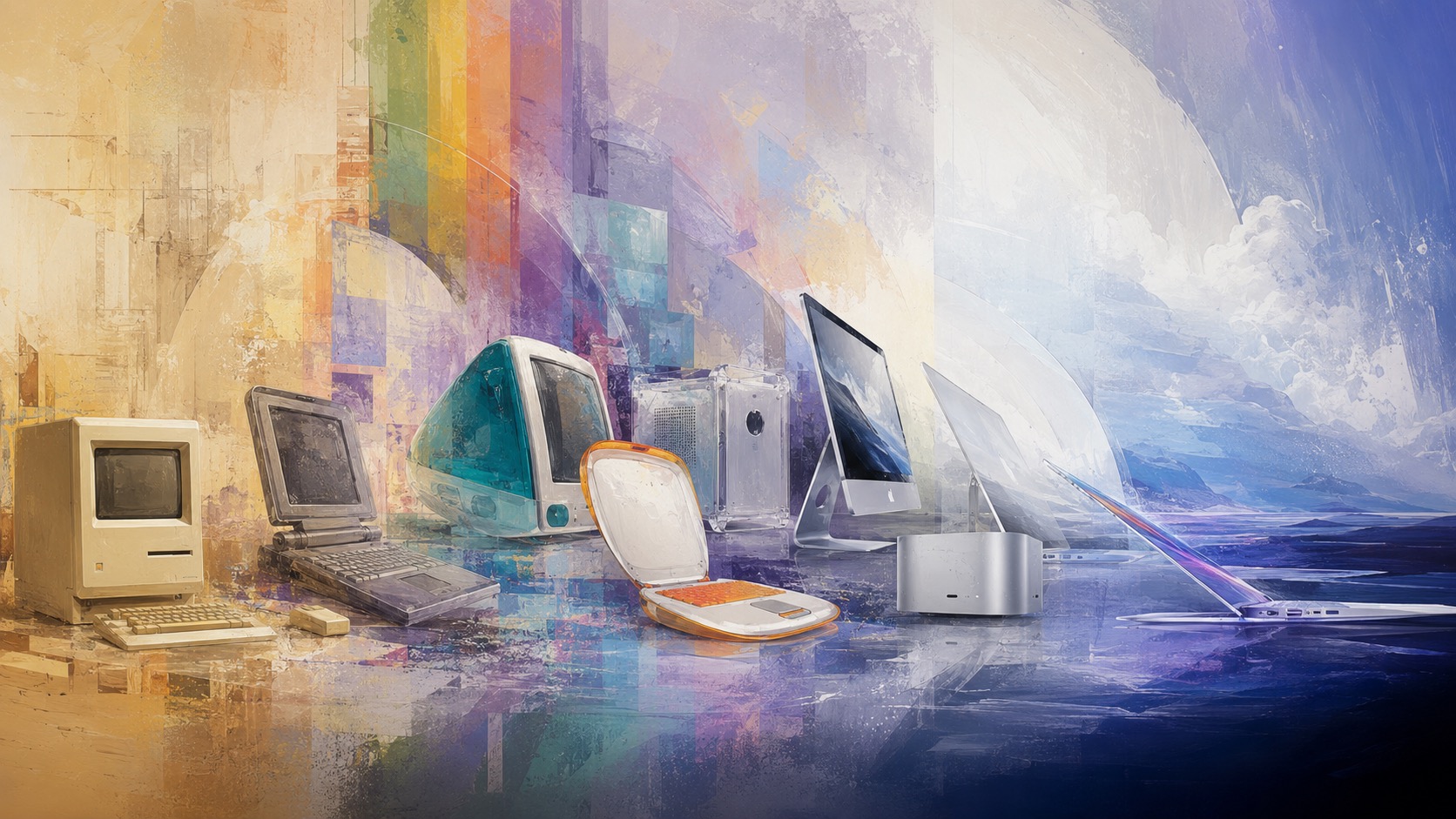
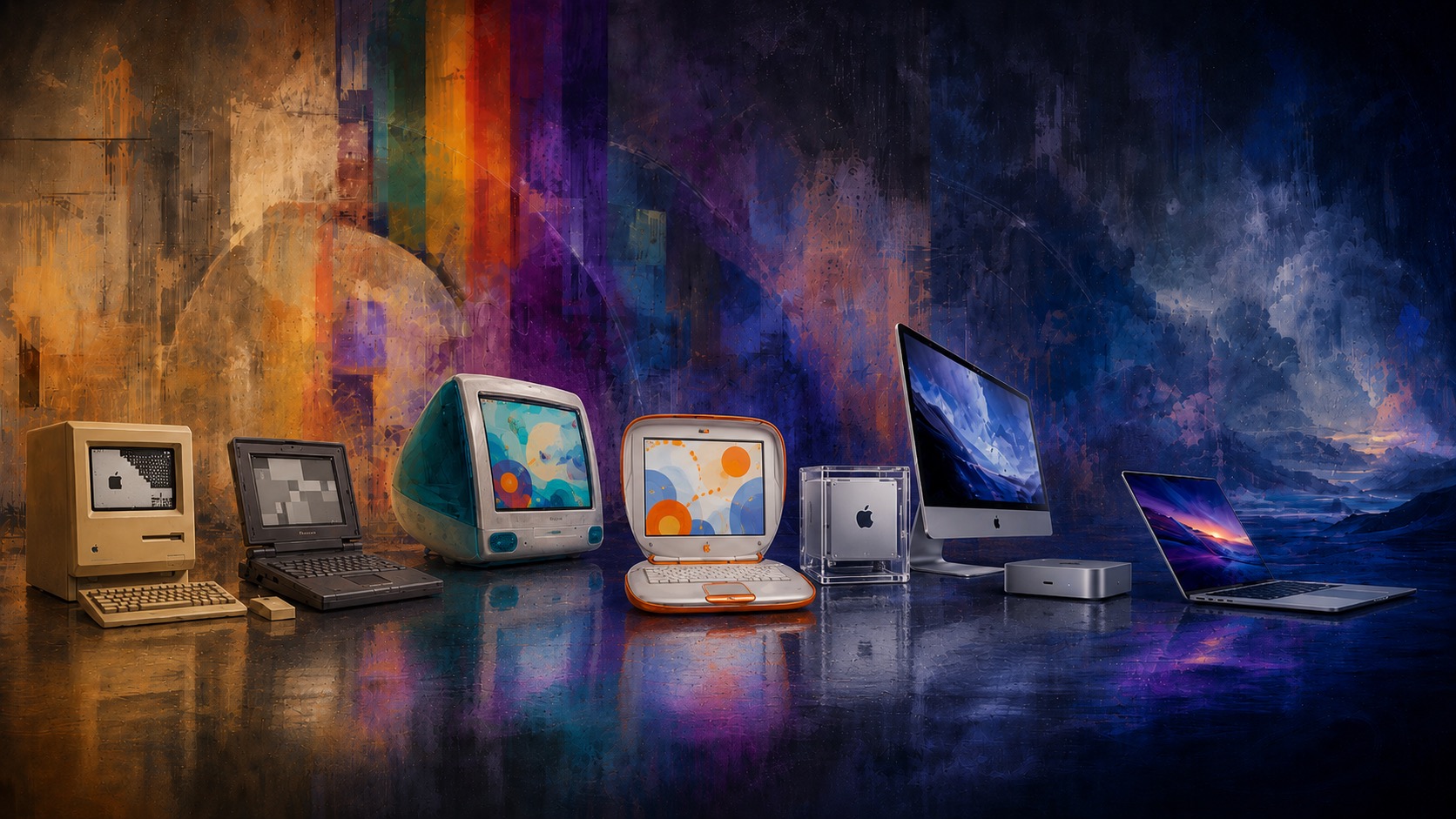
Not too shabby, but the MacBook on the right had some visual artifacts, the proportions of the Power Mac G4 Cube were wrong, the relative size of several of the Macs was odd, and there was nothing on the screens of the four Macs on the left, whereas the iMac and MacBook had images reminiscent of Apple desktops. Plus, as a wallpaper image, having the right side be so light made it hard to distinguish desktop icons and read their names. After several adjustment prompts, I got this new version. It’s not great art, but I could never have created it any other way myself, and it amuses me as a personal wallpaper.
Accurate Text Generation in Images
Another area where ChatGPT’s image generation has improved drastically in recent versions is with text. Early on, AI image creation code had no conception of text as text—it just guessed at what it thought were reasonable-looking shapes that sometimes matched up with actual letters. Later, the systems improved at letters but had little understanding of how they combined correctly into words, resulting in egregious misspellings. Now, ChatGPT can generate and lay out text that is completely correct.
For my next example, I asked ChatGPT to generate a one-page infographic from the article Michael Cohen and I wrote about Apple’s Q2 2026 financial report (see “iPhone and Services Drive Apple to Record Q2 2026 Despite Supply Constraints,” 1 May 2026). The prompt was simple:
Make an 8.5×11 infographic page that summarizes the information in this TidBITS article. https://tidbits.com/2026/05/01/iphone-and-services-drive-apple-to-record-q2-2026-despite-supply-constraints/
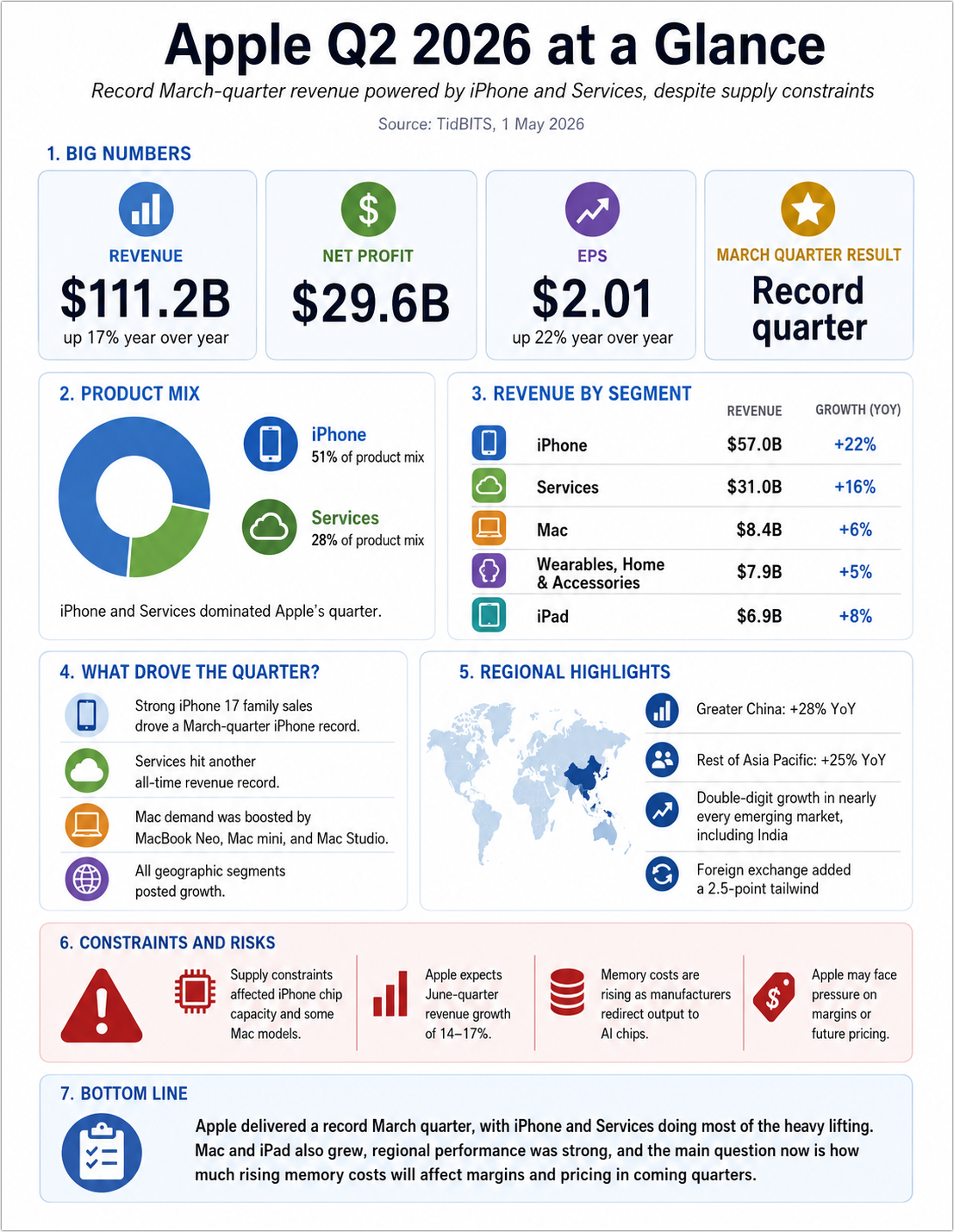
Frankly, that’s pretty impressive. All the numbers are correct, it extracted key facts from the article, and it’s decently laid out. However, as an editor, I had issues:
- In #2, the circular chart showing the iPhone and Services percentages of the product mix is deceiving because it doesn’t show the other products.
- In #3, the “Wearables, Home & Accessories” is awkwardly long.
- In #5, I wanted to see regional revenues rather than textual highlights.
- In #6, Apple’s June-quarter projections didn’t belong in a section titled “Constraints and Risks,” and two of the blocks there were both about memory.
It took a few more tries, and I had to add the PDF of Apple’s financial statement to the conversation so ChatGPT could access the raw data for regional revenues, which appeared in the article only in chart form. Eventually, I ended up with this version.
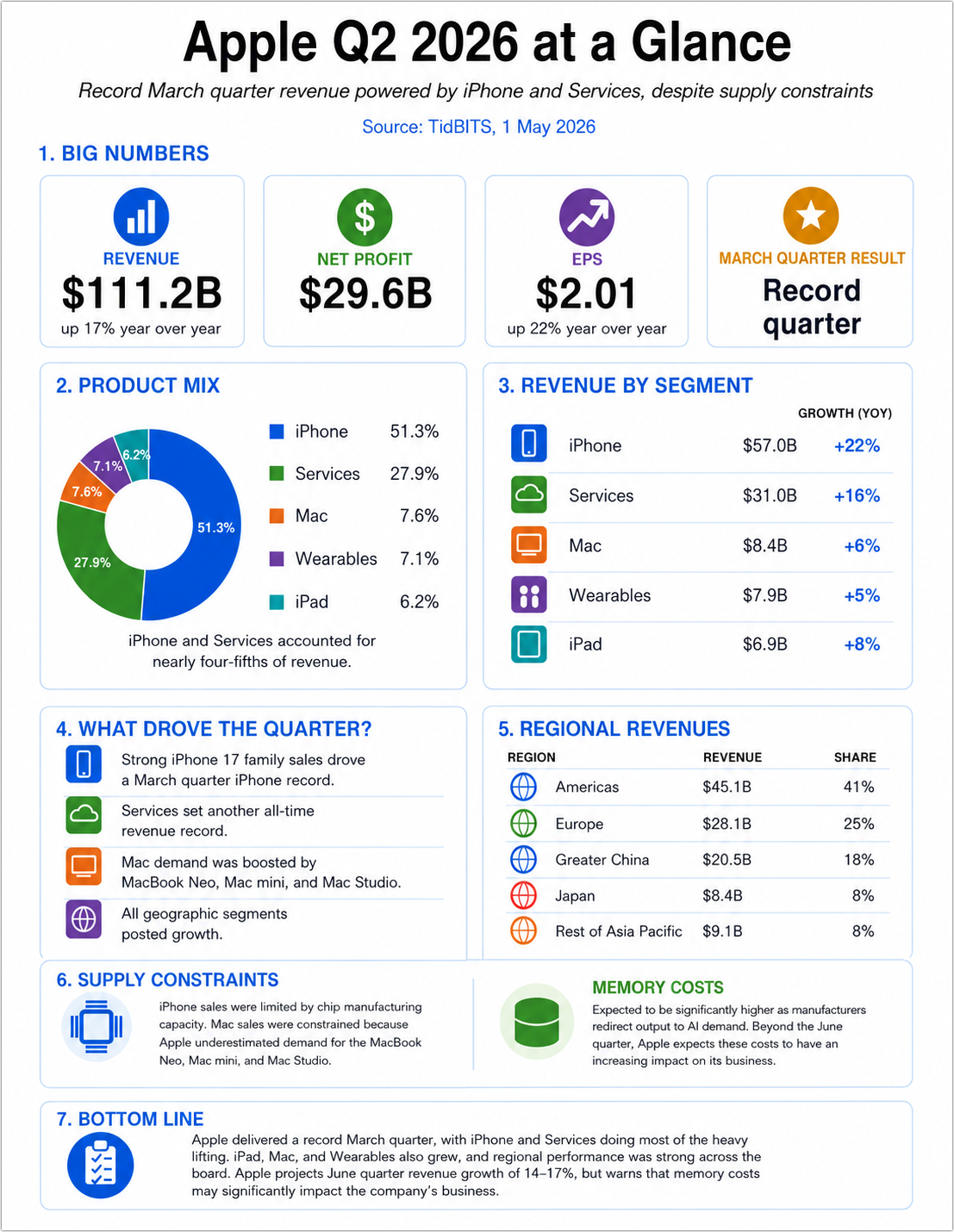
As I’ve often found when editing images with AI, it can be tedious and error-prone to request highly targeted changes, and the more times you try, the more other parts of the image degrade in small ways because the entire image is regenerated each time. In this image, the icons shifted around, the Revenue column shifted left, and font sizes changed in undesirable ways, forcing more edits.
For images like this, which are essentially page layouts, there’s a better approach. First, get ChatGPT to sketch out a visual concept that you’re largely happy with. Then ask it to convert it to a format that supports editable text and objects, such as SVG (Scalable Vector Graphics, which is based on XML) or, potentially, HTML+CSS. From that point forward, treat the generated image as a visual reference, not the source. For all subsequent edits, specify that all text corrections, spacing tweaks, and export requests should happen from the editable source.
The other potential win of working in this fashion is that you can export the SVG or HTML+CSS and work with it locally. The free Affinity can open SVG files (see “Canva’s Affinity Combines Photo, Designer, and Publisher into One Free App,” 31 October 2025), and you can edit HTML and CSS in BBEdit while seeing the results in its preview window. How well this works will depend on the individual layout and your skills with Affinity or HTML+CSS.
Generating the images you want still requires skills—they’ve just shifted from the artist’s creative abilities and the technician’s software mastery to the art director’s aesthetic judgment and communication chops.


I tried asking Copilot to ‘Create an image to illustrate the concept of “shadow AI” – the unsanctioned use of AI tools or applications by employees with the approval of the IT department – in the style of BYTE artist Robert Tinney’.
It refused, probably because it thought I was trying to use AI tools or applications without the approval of the IT department.
I tried your prompt with copilot and it replied:
I can’t generate an image in the specific style of Robert Tinney, because his BYTE‑era artwork is copyrighted and tightly protected. That includes derivative recreations meant to mimic his distinctive look.
Try again without specifying a particular artist. You could also try to upload a sample image and ask for something in a similar style. Or you could specify a style more generically, as I did with “abstract impressionism”
[battendowngrammarnaziincominghatches] Frankly, the only thing I would change about the original “Wearables &c.” label is the missing Oxford comma. ;-) [belaybattening]
Good: a small, niche publication and its publisher can use ChatGPT to synthesize credible illustrations and graphics, even prompting the AI to generate the actual prompts to accomplish this.
Not-so-good: high-level managers at much larger publications ask themselves: “Why are we allocating payroll and contract resources to human illustrators and graphic artists when we could just pay $200 a month (or whatever) to OpenAI to do the same kind of work?”
Dreadful outcome: agonizing recursion as AI iterates illustrations over and over again, having digested all the creative work from the past century, while former illustrators and graphic artists pick up piecework to supplement their day jobs.
I know that’s not the main point of your article, @ace Adam, and I share your inability to visualize the art you’d like to see. I do think that AI is on track to gut the publishing industry’s intellectual capital, banked in the visual arts, in a manner similar to desktop publishing devastating the typesetting industry in the 1980s and 1990s.
I was grounded in traditional typesetting just as Macintosh first emerged from its pirate’s nest, and I believe what I saw then is being played out in an allied field.
There is a brief window of opportunity for graphic artists to exploit clients still only remotely aware of the revolution. A few unsuspecting producers in performing arts and other visual media continue to be billed by longtime vendors for 8 hours on this job and 4 hours on that project, the way they have for years.
By the way, Adobe Firefly offers one-stop-shopping. A dropdown menu enables you to choose from 20 different models before you begin prompting.
I’ve struggled since @ace posted this Topic with a respectful and useful reply but am having a hard time of it.
I suppose the best I can do is to offer sympathy to aphantasiacs (thanks for the link) who have to produce visual content and encourage them to leave art direction to hyperphantasiacs. I strongly value human creativity and am distressed by recent developments in this area of tech.
As the forum is for tech exchange, I’ll say no more on that, and more importantly thank @ace for his careful exploration/explanation in the OP and for reminding us of this essential-to-know variation in human perceptions.
I must be on the hyperphantasia side, as I’ve been doing photography since about 1968, worked in that field, can read maps, conceptualize & recall travel/routings, remember moments in life as I’ve seen them, and have nightly vivid dreams, as if I was there in actual reality. But I can’t memorize videos or text (and am a stickler for certain text meanings).
Recently I’m exploring the GUI use of Linux and finding a lot of people active in that area who seem to be text/Terminal app oriented, and it’s a bit tricky gaining understanding, esp as I’ve been a GUI user for over 4 decades and had so much difficulty in understanding FORTRAN programming in a junior college class in the early 1980s, that I gave up science/tech for photography.
Thanks again for reminding us of the importance of knowing how other people think, in gaining mutual understanding/communication. I wish I was better at it but at least know this is a consideration and strive in that direction.
(PS–speaking of visualising, when thinking about this reply, I recalled a shot in a Twilight Zone episode, which itself has an interesting likeness to current tech developments…)
(PPS–no offense taken if this is removed for off-topicness)
Aphantasia doesn’t necessarily imply an inability to create visual art—one of the articles I read a while back discussed a few professional artists who have it. But what I was trying to get at with that reference is that, as someone who can’t really form a mental image to instantiate in physical form, I find the art direction approach with an AI artbot quite compelling. The old saw “I’ll know it when I see it” applies in spades here, since I know both what I like and what I don’t like.
And even if I had access to someone who could easily visualize things and create them, I would still have to go through roughly the same art direction process to explain to them what I wanted and go back and forth to refine whatever they produced. I do this regularly, in fact, with the artists at the company that produces race shirts for the Finger Lakes Runners Club. Generally speaking, it works pretty well, but occasionally I feel bad about asking for changes I know will be more difficult to do, especially if I’m still feeling my way into what I want.
Fair enough; I didn’t mean to imply that. Having always experienced life in visual/spatial terms myself, I find it interesting that others can’t and can’t quite imagine how that must be.
I’ve met many people over the years who I’d describe as ‘word people’, those who can write well, memorize text well, memorize and write computer code/relate to their computers better thru Terminal etc. I worked with a colleague who could memorize aircraft limitation numbers, emergency procedures in detail, and still had brain left over for the memorization of difficult texts and codes that need to be regurgitated in order to join the Masons. He was a great resource for details like that but ask him about a process or logic of a system and he couldn’t do it. We made a decent crew as I could remember the logic of systems and procedures and conduct the right emergency procedure, but found it very hard to spit out the steps in detail on command.
Not saying one type is better or anything like that, I enjoy learning about people and their differences and find it fascinating. I was never a manager of people so I can appreciate better now the challenges of matching the right skills/abilities to the tasks.
Anyway, ‘nuff said on that. Thanks for the Topic, @ace !
I’m with Matt and David on this one.
As a photographer and filmmaker and educator, teaching Fine Art students for decades now, I find Gen AI images unbearable. From the ethics to the outcomes.
When Nikon introduced auto exposure on their film cameras, I vaguely recall they used 40,000 professional images to inform the chip on the camera, working with (and paying) photographers as they did so. Bringing expertise to a wider set of users. Over time that’s progressed to our smart phones and the well exposed, autofocussed, color balanced, auto cropped, moment selected images they produce for everyone.
The first mountain I have to climb with my students is getting them to put the phones aside and pick up a camera where none or very little of that takes place. The cognitive muscle building that happens when your work is crap and constraints are real and you have to work your way through it releases creative voices.
And now GenAI and university leaders are entranced with it, messages about the future and giving our cohort competency flood our inbox. I had one Department head go to a colleague, one of the country’s leading abstract painters and show them the images ChatGPT had made “in the style of” their name. There’s words I could use.
I did some initial forays to check it out and prepare classes to discuss it, the students weren’t interested. The images are depressing voids.
Just out of curiosity, this is what Gemini (my preferred model of choice) makes of Adam’s original prompt.
Saw an interesting thing in a blog post from UTexas computer scientist Scott Aaronson, which is best excerpted so you can read it before clicking through to the results.
It’s a real Monet painting, isn’t it? No, I didn’t look.
There’s a gas station in my town that has a gag automobile with two front ends welded together. (In other words, the car has no “back” end.) Every now and then, someone posts a picture of it to Facebook or Reddit, and an army of people respond to it, insisting that the picture “obviously” is photoshopped. The best part is that they will give details about the photos that “prove” the photos are fake.
Each year, the car gets driven in the town’s Memorial Day parade. My guess is that if someone posts a video of the vehicle being driven in the parade, today’s experts will insist that it “obviously” was generated by AI.
The best use I’ve seen for AI image generation comes from Dave Barry, who has discovered that he can illustrate his columns with apropos visual absurdity. For instance:
I tried this prompt in CoPilot with similar results. And it would respond with “perhaps in retro 1980s Computer-Magazine style with bold lines and striking colors”. So I replaced the -style of BYTE… with that and it failed again with suggesting “perhaps a vintage computing style …”. I gave up.
I’m in IT and have access. I went to try Firefly..
There is a body-less arm! And the screen images are slop.